
Integrasi
Spesies terdekat GBIF
The app queries the published GBIF occurrence record around your current position and returns the taxa that have been recorded there, arranged in a taxonomic tree you can expand level by level and download from. It shows which groups are represented, how many distinct species (or higher taxa, at the detail level you choose) each group holds in the published record, and which names belong to those groups, before you start your own recording.
Membukanya
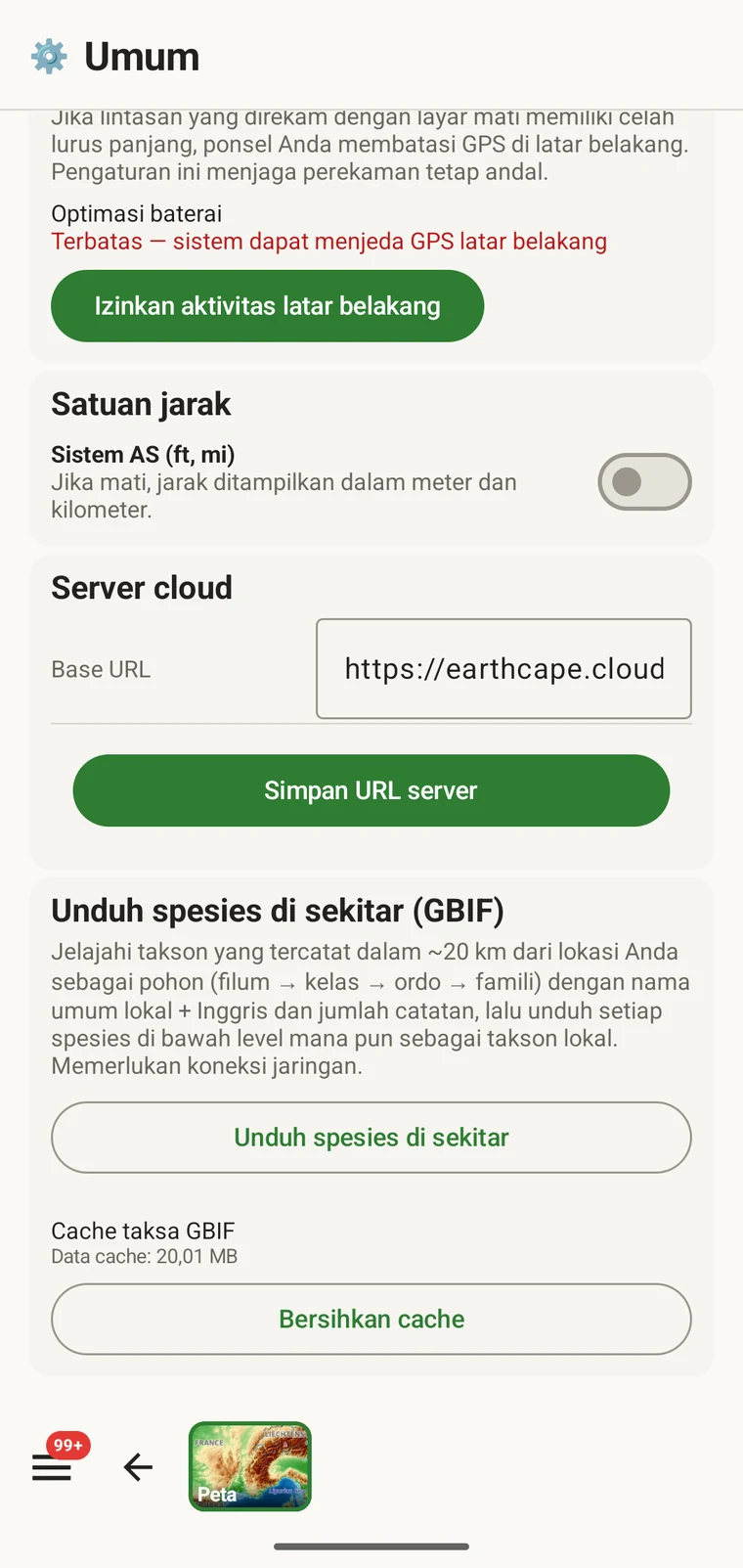
The entry point is the Download nearby species (GBIF) card under Menu → Admin → General; it is also offered during first-run setup. Scroll to the card and tap Download nearby species. The query runs against the live GBIF API, so you need a connection. Run it before you leave for the field, not once you have lost signal.
Apa yang dikembalikan kueri
The query looks at GBIF occurrence records within 20 km of your current position and groups them by phylum, giving for each phylum the number of distinct taxa at the chosen detail level (species by default). The sheet shows the top-level summary once Get data has run.
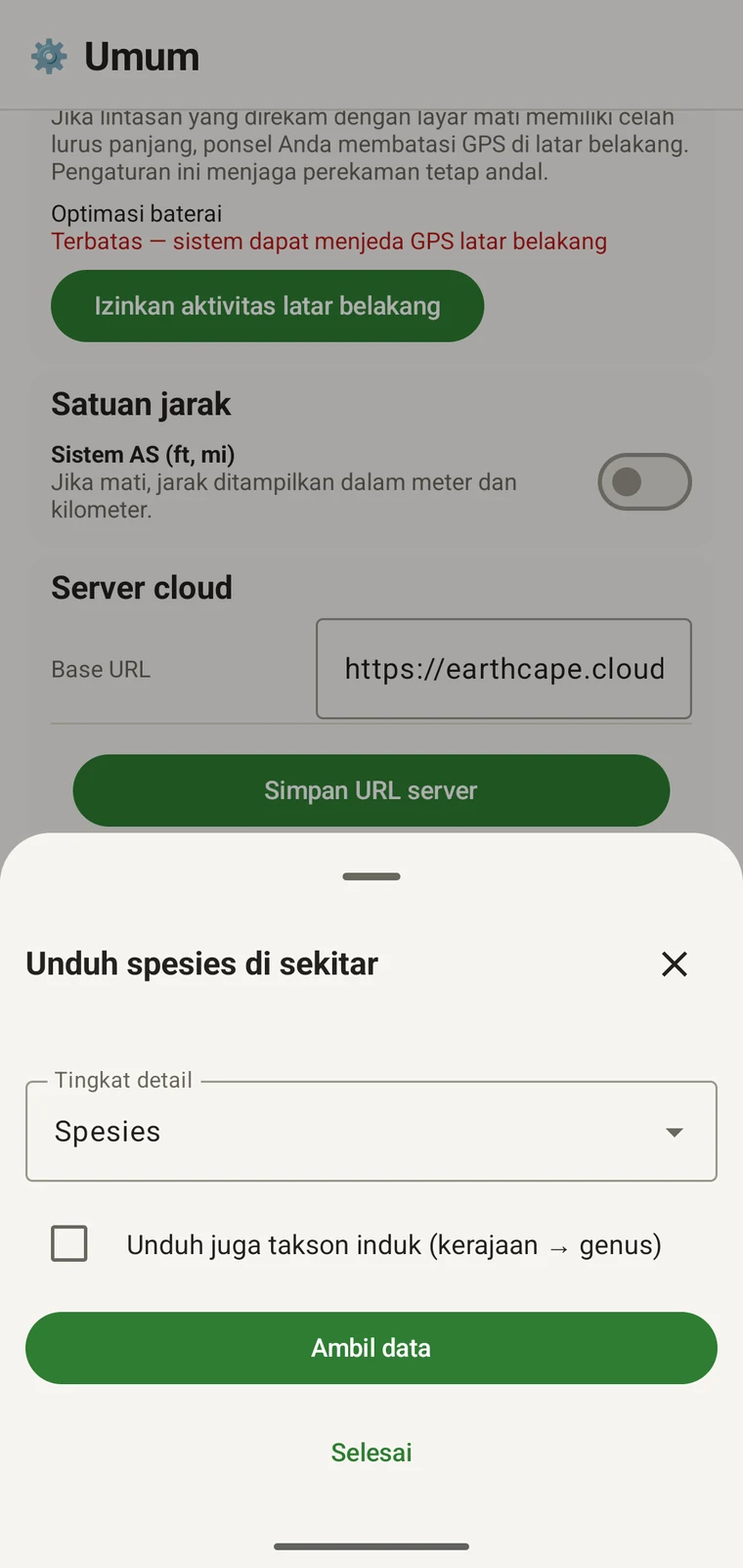
On opening, the sheet shows two controls and two buttons:
- Detail level (Phylum, Class, Order, Family or Species; Species is the default) — sets how far down the taxonomy the download goes when you tick a group.
- Also download parent taxa (kingdom → genus) checkbox — off by default; covered in its own section below.
- Get data — takes a GPS fix and loads the taxonomic tree for the area. Nothing is downloaded yet.
- Selesai — menutup lembar tersebut.
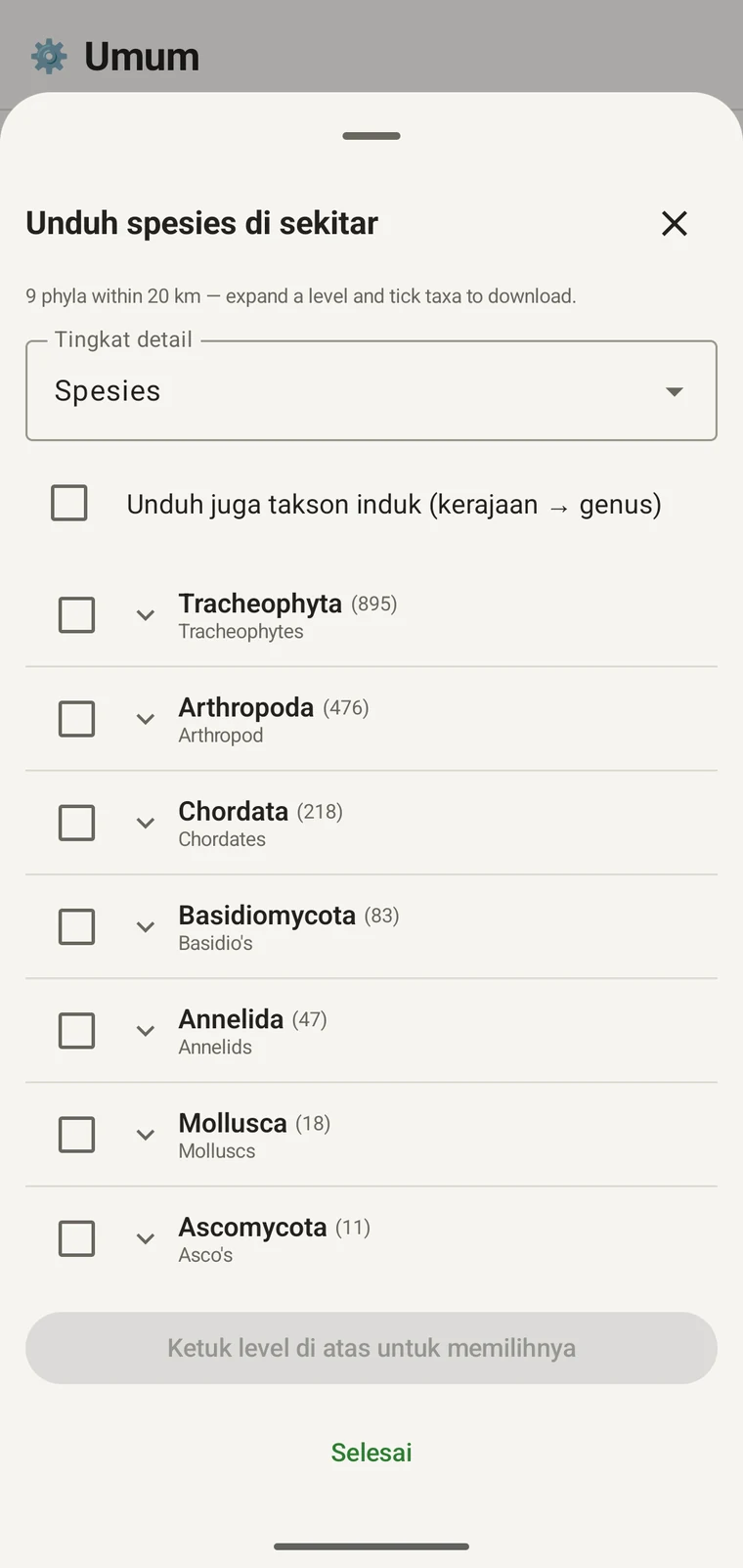
Once the tree has loaded the header reads, for example, "9 phyla within 20 km — expand a level and tick taxa to download.", a Select all row appears above the tree, and a Download N selected button replaces Get data.
Contoh di bawah berasal dari satu survei pegunungan. Situs Anda sendiri akan mengembalikan angkanya sendiri.
| Filum | Species within 20 km |
|---|---|
| Tracheophyta | 895 |
| Arthropoda | 476 |
| Chordata | 218 |
| Basidiomycota | 83 |
| Annelida | 47 |
| Mollusca | 18 |
| Ascomycota | 11 |
Menelusuri lebih dalam
Tap a phylum to expand it to its constituent classes, and tap a class to expand to orders. At each level the number in brackets is the count of distinct taxa at the chosen detail level recorded under that group within the search radius. A count shown as 1,000+ has hit the query cap.
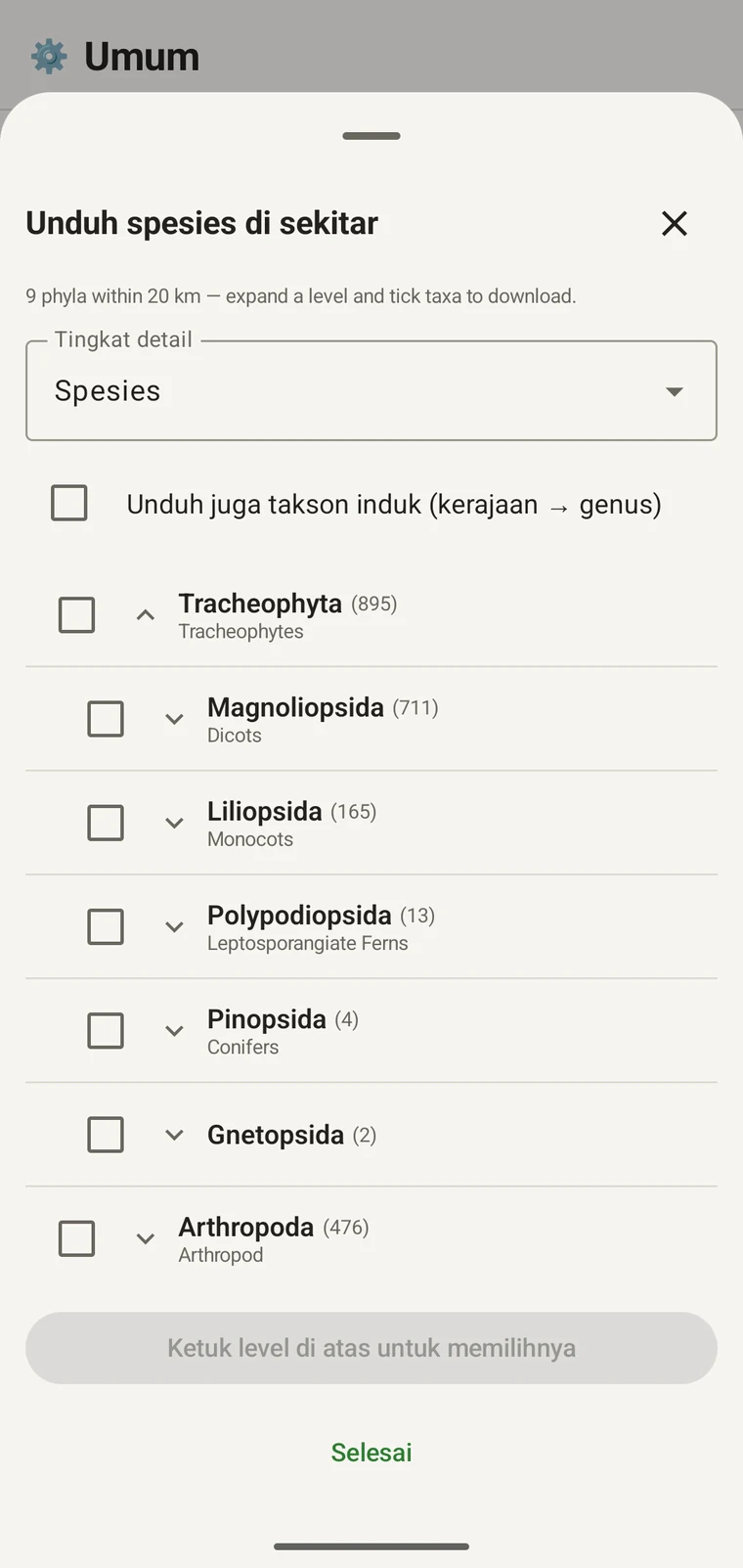
Melanjutkan contoh yang sama: Tracheophyta terbentang menjadi Magnoliopsida 711, Liliopsida 165, Polypodiopsida 13, Pinopsida 4, Gnetopsida 2. Membentangkan Magnoliopsida menghasilkan Asterales 115, Lamiales 100, Fabales 93, Rosales 56, Caryophyllales 49, masing-masing ditampilkan dengan nama umumnya.
The counts are numbers of distinct taxa in the published record, not record totals and not abundance estimates. A high count means many taxa in that group have been recorded and published for this area; a low count means the group is either genuinely species-poor here or simply under-surveyed and under-published. The distinction matters when you use the figures to plan work — see the section on survey planning below.
Tingkat detail dan takson induk
The Detail level control sets the rank down to which taxa are downloaded when you tick a group. At Species, the download includes all species in GBIF's record for that group within the radius. If you are working at a coarser resolution — mapping genera only, for example — you can set the detail level to Family, Order, Class or Phylum to reduce the volume of names brought onto the device.
The Also download parent taxa (kingdom → genus) checkbox controls whether the higher ranks are fetched alongside the species. It is off by default; tick it in almost every case. Without it, the species names arrive on the device as orphans: the taxonomy held locally has no genus, family or order to attach them to, so they cannot be browsed by higher taxon and any rollup by group in your own data will not resolve correctly. Leave it off only if storage is genuinely tight and you intend to work entirely at species level with no hierarchical browsing.
Mengunduh takson ke perangkat
Nothing is pre-loaded onto the device for any particular site. The GBIF query populates the local taxonomy with GBIF Backbone names known to occur nearby, so when you record an observation you are picking from taxa that have actually been found at the site, rather than searching the full global list — and those names stay on the device once they are downloaded.
- Setel Tingkat detail ke tingkatan yang sesuai dengan kebutuhan pencatatan Anda. Spesies adalah nilai bawaannya.
- Tap Get data to load the tree for your position.
- Ketuk sebuah filum untuk membentangkannya, lalu bentangkan lebih jauh ke kelas atau ordo yang Anda inginkan.
- Centang kotak di samping setiap kelompok yang akan Anda catat. Anda dapat mencentang pada tingkatan mana pun — mencentang sebuah kelas akan mengunduh semua takson penyusunnya hingga tingkat detail yang Anda tetapkan.
- Tick Also download parent taxa unless storage is genuinely tight.
- Tap Download N selected. The app fetches the ticked taxa from GBIF and writes them to the local database in the background; a notification shows progress and you can close the sheet meanwhile.
- Ketuk Selesai untuk menutup lembar tersebut.
Nama yang telah diunduh kemudian dapat dicari secara luring ketika Anda memasukkan observasi di Mencatat observasi. Anda memilih dari nama-nama yang diketahui hadir secara lokal alih-alih mengetik dari ingatan terhadap taksonomi global lengkap.
Menggunakannya untuk merencanakan survei
Sebelum musim lapangan, jalankan kueri atas situs yang Anda tuju dan baca angka pada tingkat filum sebelum mengunduh apa pun. Sebaran angka itu memberi tahu Anda kelompok mana yang terwakili dengan baik dalam rekaman terpublikasi untuk area tersebut dan mana yang nyaris tidak ada.
A phylum with a handful of taxa is either genuinely absent from the site or under-surveyed and under-published there. Both cases are useful to know before a trip: genuine absence tells you where not to spend effort, and a thin published record for a group you expect to be present identifies a gap you can target.
Unduh takson hanya untuk kelompok yang akan Anda catat secara aktif pada suatu perjalanan. Tidak ada manfaatnya memuat seluruh pohon ke perangkat jika Anda mengerjakan satu filum saja; unduhan itu memakan waktu dan lebar pita koneksi yang mungkin tidak Anda miliki.
Batasan
Kueri ini memerlukan koneksi aktif ke API GBIF. Kueri tidak dapat berjalan secara luring, itulah sebabnya alur kerja yang dimaksudkan adalah menjalankannya sebelum Anda meninggalkan lokasi yang terhubung.
The search radius is 20 km around your current position. This is fixed by the query; there is no radius control in the app.
Angka-angka itu mencerminkan apa yang telah dipublikasikan ke GBIF. Cakupannya tidak merata antarwilayah dan antarkelompok taksonomi: vertebrata di Eropa barat umumnya terwakili dengan baik; invertebrata dan fungi di Asia tengah tidak. Angka yang rendah adalah pernyataan tentang rekaman terpublikasi untuk kombinasi kelompok dan lokasi tersebut, bukan pernyataan langsung tentang situsnya. Tafsirkan angka-angka itu dengan mengingat hal ini.
Tidak ada publikasi dari aplikasi ke GBIF. Integrasi ini bersifat hanya-baca: Anda melakukan kueri terhadap catatan yang sudah ada dan mengunduh nama takson. Untuk menyumbangkan data Anda sendiri ke GBIF, Anda mengekspor berkas Darwin Core Archive atau GBIF DwC-DP dari aplikasi dan mengirimkannya melalui jalur GBIF standar — lihat Format ekspor untuk format berkas yang tersedia.