
데이터
내보내기 형식
EarthCape writes to twelve formats — biodiversity archives, spatial files, spreadsheets and a full database backup — directly on the device, with no account and no connection required. Cloud destinations need a connection. They are the formats a repository, a GIS or a colleague will accept without conversion.
내보내기 화면
Select a project first. The export screen is at Menu → Admin → File Import & Export. The screen is divided into two sections. At the top is Import & restore, with a single entry, Import data package…, which reads a Frictionless Data Package — one you exported earlier, or one a colleague sends you. Below it is the Export grid, which lists all twelve formats by name and file extension. Tap a format to begin.
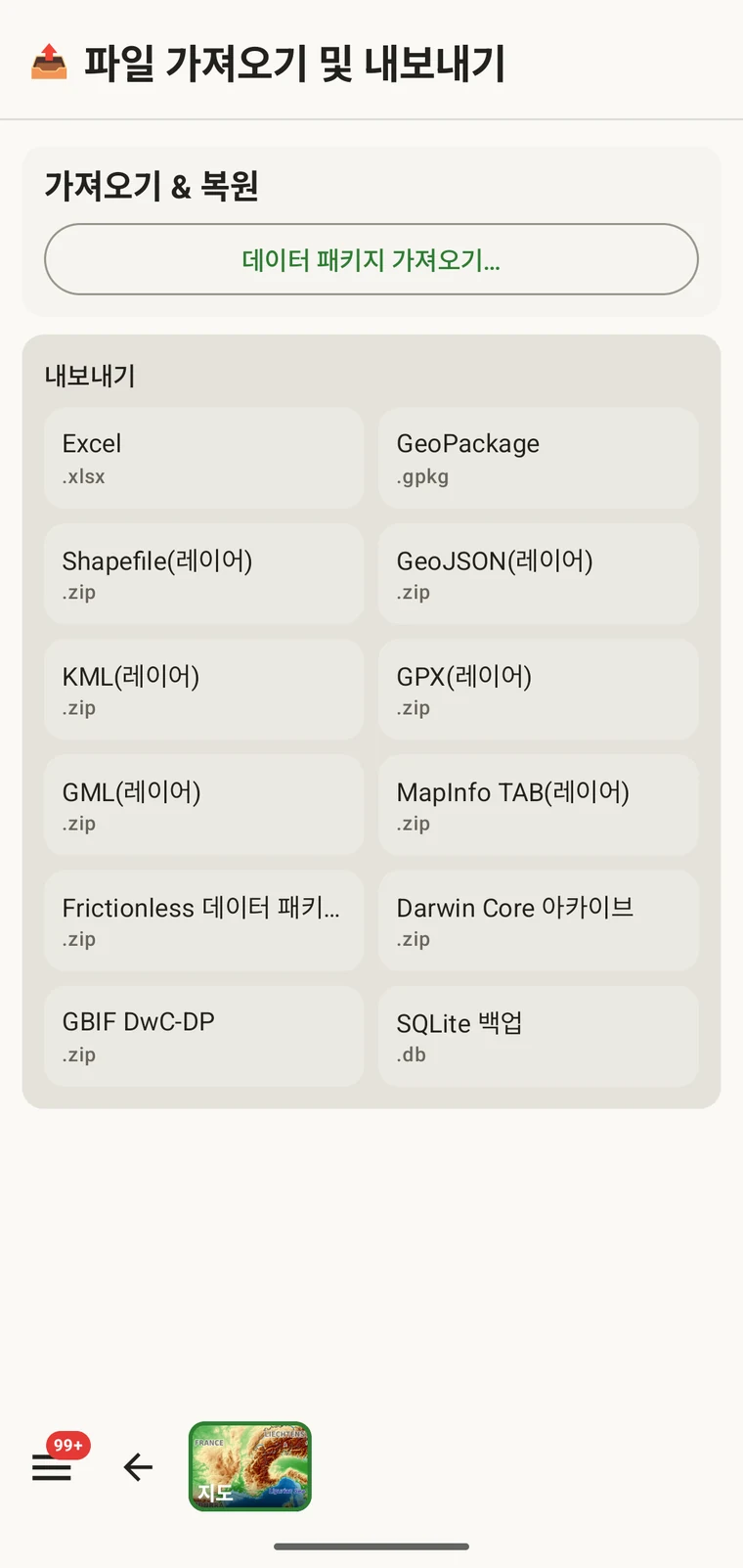
12가지 형식
12가지 형식 모두 기기에서 작성됩니다. 관여하는 서버가 없고 연결도 필요하지 않습니다.
| 형식 | 파일 | 용도 |
|---|---|---|
| Excel | .xlsx | Excel이나 유사한 도구로 작업하는 동료를 위한 스프레드시트 통합 문서 |
| GeoPackage | .gpkg | 단일 파일 OGC 공간 컨테이너이며, QGIS나 ArcGIS의 최선의 기본 선택입니다 |
| Shapefile(레이어) | .zip | ESRI Shapefile 집합이며, 엔터티 유형마다 레이어 하나씩 zip 아카이브에 담깁니다 |
| GeoJSON(레이어) | .zip | RFC 7946 GeoJSON이며, 엔터티 유형마다 파일 하나씩 zip 아카이브에 담깁니다 |
| KML(레이어) | .zip | Google Earth 및 KML을 지원하는 도구를 위한 Keyhole Markup Language이며, zip 아카이브에 담깁니다 |
| GPX(레이어) | .zip | GPS 기기와 트랙 도구를 위한 GPS Exchange Format이며, zip 아카이브에 담깁니다 |
| GML(레이어) | .zip | OGC XML 형식인 Geography Markup Language이며, zip 아카이브에 담깁니다 |
| MapInfo TAB (layers) | .zip | MapInfo interchange files (MIF/MID) for MapInfo Pro, in a zip archive |
| Frictionless 데이터 패키지 | .zip | datapackage.json 기술자를 갖춘 자기 기술형 표 패키지로, 저장소 등록과 데이터 논문에 적합합니다 |
| Darwin Core 아카이브 | .zip | GBIF와 대부분의 생물다양성 저장소가 사용하는 표준 수집 형식입니다 |
| GBIF DwC-DP | .zip | 더 새로운 GBIF 데이터 패키지 모델이며, 이를 요구하는 제출에 사용합니다 |
| SQLite 백업 | .db | A complete copy of the app's on-device database, all projects included |
생물다양성 표준
Darwin Core 아카이브는 GBIF를 비롯한 대부분의 생물다양성 저장소가 받아들이는 형식입니다. 출현 레코드는 Darwin Core 용어로 매핑되어 meta.xml 기술자와 함께 패키징되므로, 저장소는 추가 변환 없이 아카이브를 가져올 수 있습니다. GBIF DwC-DP는 더 새로운 GBIF 데이터 패키지 모델로, 서로 연결된 CSV 표(이벤트, 출현, 물질, 미디어)의 묶음이며, 이를 요구하거나 아카이브 형식보다 표 형태를 선호하는 제출처를 위한 것입니다. Frictionless 데이터 패키지는 CSV 표와 datapackage.json 기술자로 이루어진 자기 기술형 zip을 만듭니다. 데이터 논문에 딸린 저장소 등록이나, 표와 함께 Frictionless 데이터 패키지를 기대하는 작업 흐름에 알맞은 선택입니다.
공간 형식
GeoPackage is a single .gpkg file that holds all entity types in separate layers inside an SQLite container — the OGC standard for portable spatial data and the best default choice for QGIS or ArcGIS. The remaining spatial formats — Shapefile, GeoJSON, KML, GPX, GML and MapInfo TAB — are marked "(layers)" because they cannot express multiple feature types in a single file. Each one is exported as a .zip archive containing one file (or file set, for Shapefile) per entity type: observations, localities, visits (with their routes), diary entries and specimens. Unzip the archive before loading it into your GIS.
일반
Excel (.xlsx) produces a workbook, one worksheet per entity, for a colleague who works in a spreadsheet. SQLite backup (.db) is a raw copy of the app's whole database — every project — for archiving or for opening in any SQLite tool. It cannot be imported back into the app; to move data between devices use the Frictionless Data Package with Import data package…, or Backup & Restore under Menu → Admin → Account.
내보내기
- 홈 화면에서 내보낼 프로젝트를 선택하십시오.
- Open Menu → Admin → File Import & Export.
- 내보내기 그리드에서 원하는 형식을 탭하십시오.
- 파일이 작성되는 동안 기다리십시오. 사진이 있는 큰 프로젝트일수록 오래 걸리며, 화면에 진행 상황이 표시됩니다.
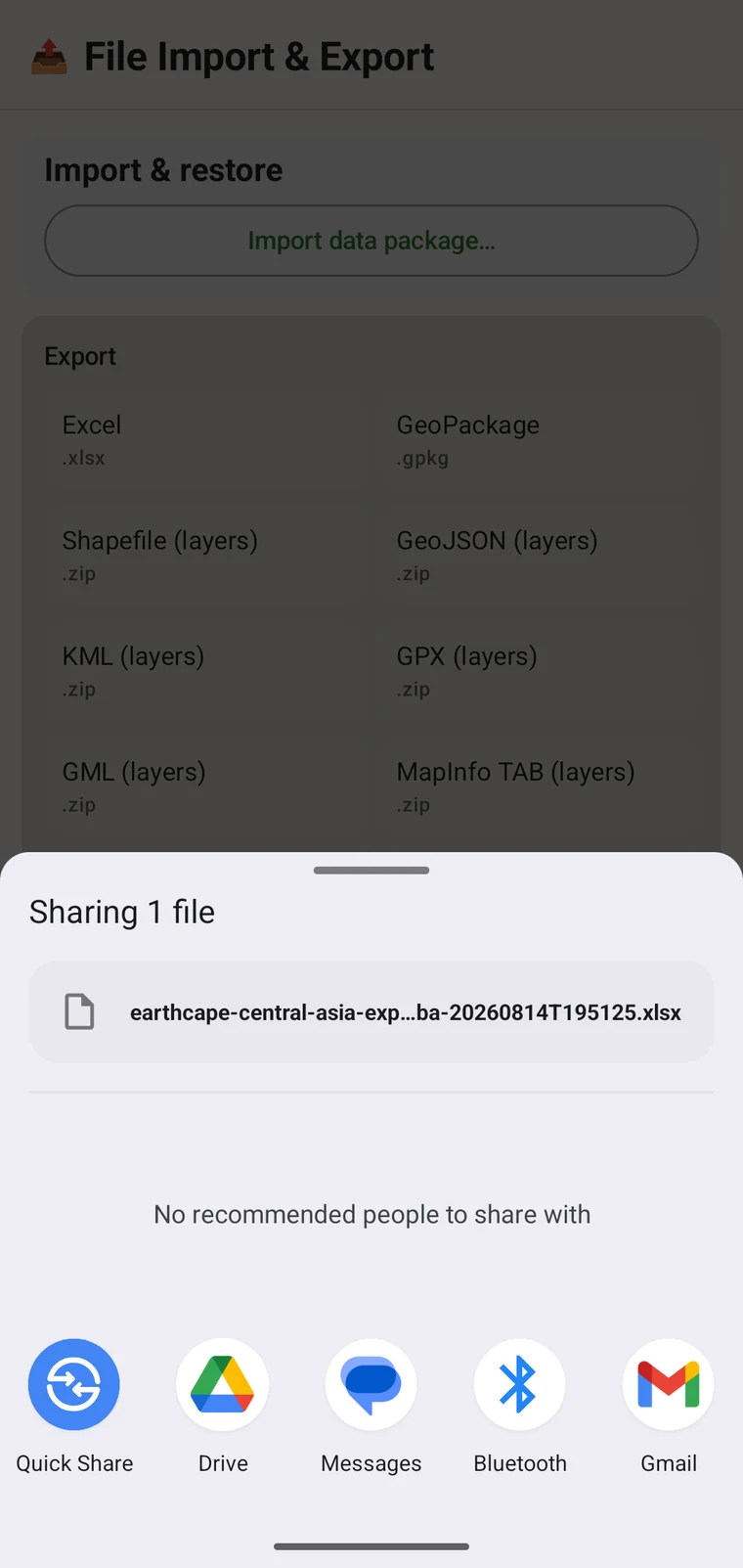
- When writing is complete, the Android share sheet appears so you can choose where the file goes. A Save to Downloads action is also offered if you prefer to keep the file on the device.
파일 이름은 프로젝트 이름과 타임스탬프로 생성되며, 예를 들면 earthcape-central-asia-exp…ba-20260814T195125.xlsx와 같습니다. 각 내보내기는 고유한 이름을 받으므로, 같은 프로젝트를 반복해서 내보내도 서로 덮어쓰지 않습니다.
파일이 가는 곳
Once the file is written, the Android share sheet opens with the usual destinations: Quick Share, Drive, Messages, Bluetooth, Gmail, and any other app registered on your device that accepts files. You can share the export immediately, or save it locally and upload later. If you have configured a cloud destination (see below), you can export the project there directly from its Integrations page instead of using the share sheet.
클라우드 대상
Three cloud destinations are available under Menu → Admin → Integrations: Google Drive, Dropbox and Zenodo. Open a provider's page to sign in and to export the current project there; the export screen itself writes local files only.
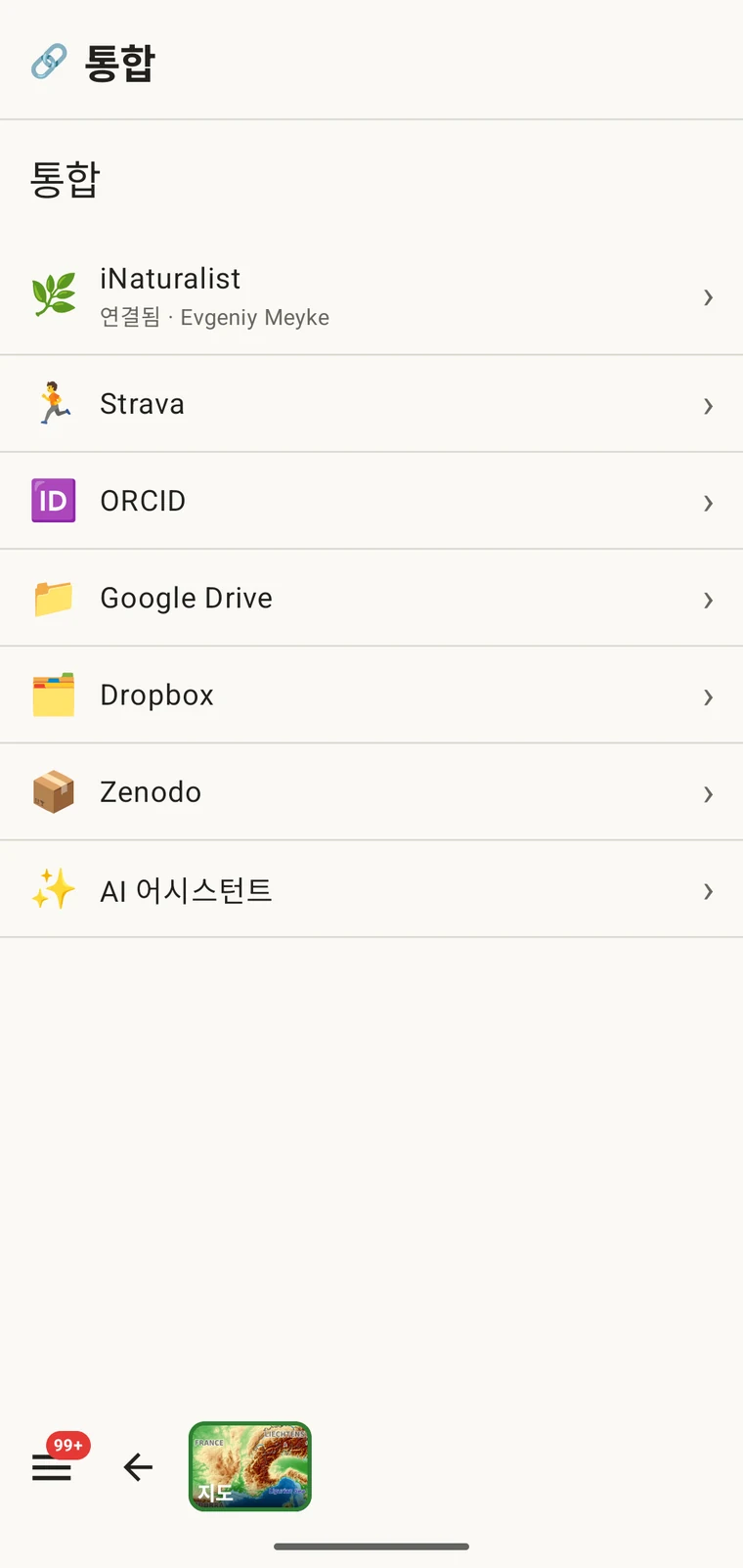
Google Drive와 Dropbox는 작업 파일과 팀 공동 작업에 적합합니다 — 내보낸 파일을 공유 폴더에 두면 동료가 가져갑니다. Zenodo는 CERN이 운영하는 연구 저장소로 기탁마다 DOI를 발급하므로, 논문과 함께 인용 가능한 아카이브 데이터 릴리스에 적합합니다. Drive를 사용하는 전체 공동 작업 절차는 Google Drive 공동 작업을 참조하십시오.
GBIF로의 게시는 지원하지 않습니다. EarthCape는 레코드를 GBIF에 직접 제출하지 않습니다. GBIF에 기여하려면 Darwin Core 아카이브를 내보낸 뒤 소속 기관이나 GBIF가 승인한 데이터 게시자를 통해 제출하십시오.
프로젝트 패키지: 가져오기 및 복원
화면 위쪽의 데이터 패키지 가져오기… 항목은 다른 종류의 파일을 다룹니다: 프로젝트 패키지입니다. 프로젝트 패키지는 프로젝트의 구성 — 프로토콜, 양식 레이아웃, 사용자 지정 필드, 설정 — 을 담고 있으므로, 구성된 프로젝트를 동료에게 넘기거나 설정을 잃지 않고 새 기기로 옮길 수 있습니다.
프로젝트 패키지는 데이터 내보내기와 다릅니다. GIS나 저장소로 가져오기 위한 것이 아니라, 구성된 작업 환경을 한 설치본에서 다른 설치본으로 옮기기 위한 것입니다. 사용자 지정 필드 정의, 프로토콜 선택, 양식 레이아웃이 모두 패키지와 함께 이동합니다. 사용자 지정 필드의 작동 방식은 양식 및 사용자 지정 필드를, 프로토콜 구성은 조사 프로토콜을 참조하십시오.
형식 선택하기
적절한 형식은 데이터로 무엇을 하려는지에 따라 달라집니다.
| 대상 또는 용도 | 선택할 형식 |
|---|---|
| GBIF 또는 생물다양성 저장소에 제출 | Darwin Core 아카이브, 저장소가 요구하는 경우 GBIF DwC-DP |
| QGIS 또는 ArcGIS에서 열기 | GeoPackage — 단일 파일에 모든 레이어 포함 |
| 스프레드시트를 사용하는 동료에게 전송 | Excel |
| 데이터 논문 기탁 또는 스키마를 요구하는 저장소 | Frictionless 데이터 패키지 |
| 전체 백업 또는 다른 기기로 이동 | SQLite 백업 |
| GPS 기기 또는 다른 트랙 애플리케이션 | GPX |
| Google Earth에서 보기 | KML |
| DOI가 있는 인용 가능한 아카이브 기탁 | Zenodo로 전송한 모든 형식 |
오프라인 작업
12가지 형식 모두 전적으로 기기에서 작성됩니다. 내보내기에 연결은 필요하지 않습니다: 파일은 로컬 데이터베이스에서 조립되어 로컬 저장소에 기록됩니다. 클라우드 대상 — Drive, Dropbox, Zenodo — 만 업로드를 마치기 위해 신호가 필요합니다. 연결이 없는 야외에 있다면 지금 로컬 파일로 내보내고, 연결이 된 뒤에 클라우드 대상으로 전송하십시오.