
통합
iNaturalist
iNaturalist 계정을 연결하면 기록 중인 프로젝트 안에서 본인의 관찰을 다룰 수 있습니다. 관찰을 프로젝트로 가져오고, EarthCape에서 만든 레코드를 iNaturalist로 다시 보내십시오. 보내는 것은 직접 고른 것뿐이며, 시점도 직접 정합니다.
계정 연결하기
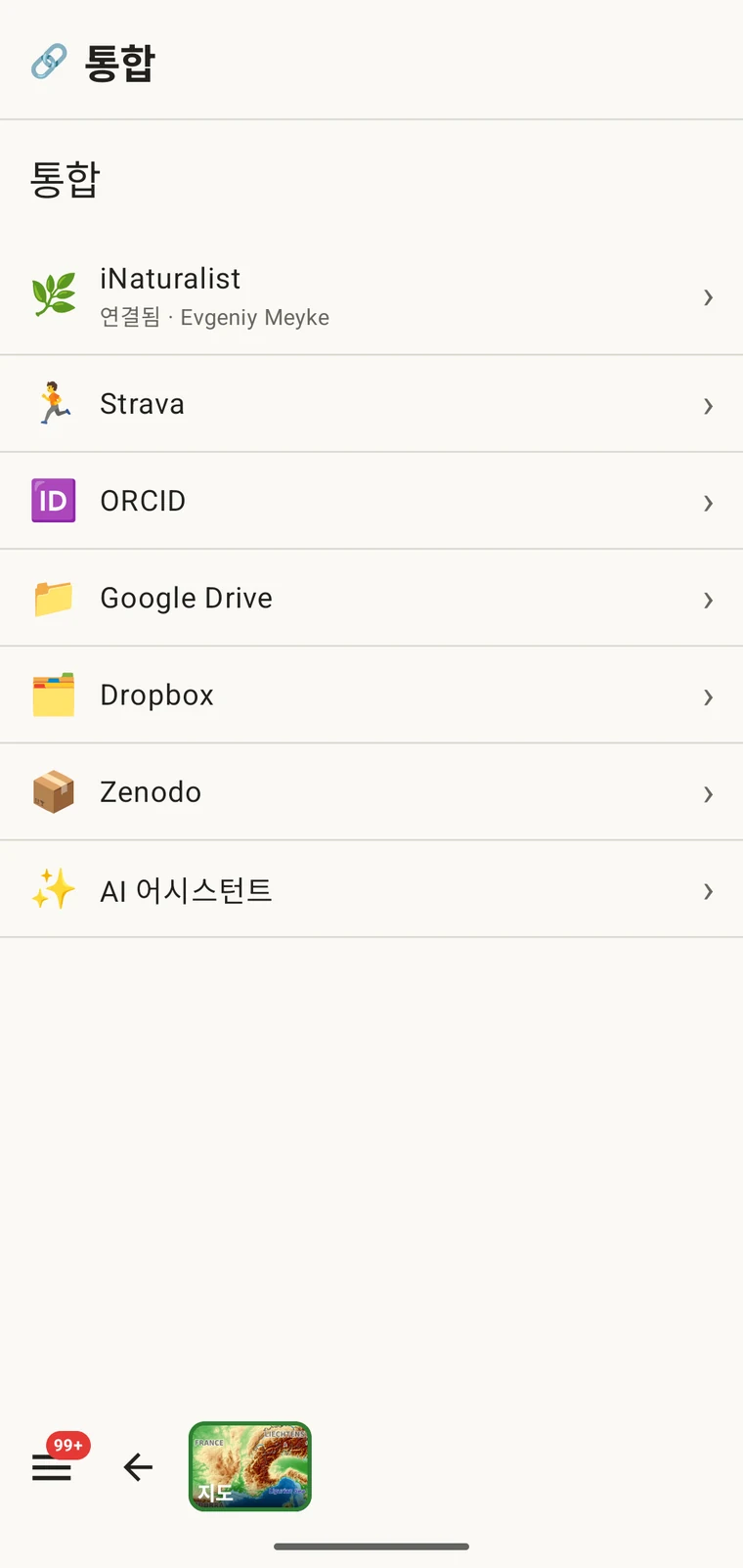
The connection is made from the Integrations screen under Menu → Admin → Integrations, which lists every external service the app can work with. You sign in with your existing iNaturalist credentials; EarthCape does not store your iNaturalist password.
- Open Menu → Admin → Integrations.
- Tap the iNaturalist row, then Connect.
- Sign in on the iNaturalist page that opens in your browser.
- EarthCape가 본인의 관찰에 접근하도록 허용하십시오.
인증. EarthCape는 다른 서드파티 iNaturalist 클라이언트와 동일한 방식인 OAuth로 iNaturalist에 인증합니다. 비밀번호는 EarthCape가 아니라 iNaturalist로 전달됩니다. 이 앱에서 연결을 제거하는 것과는 별개로, iNaturalist 계정 설정에서 언제든지 권한을 철회할 수 있습니다.
허브
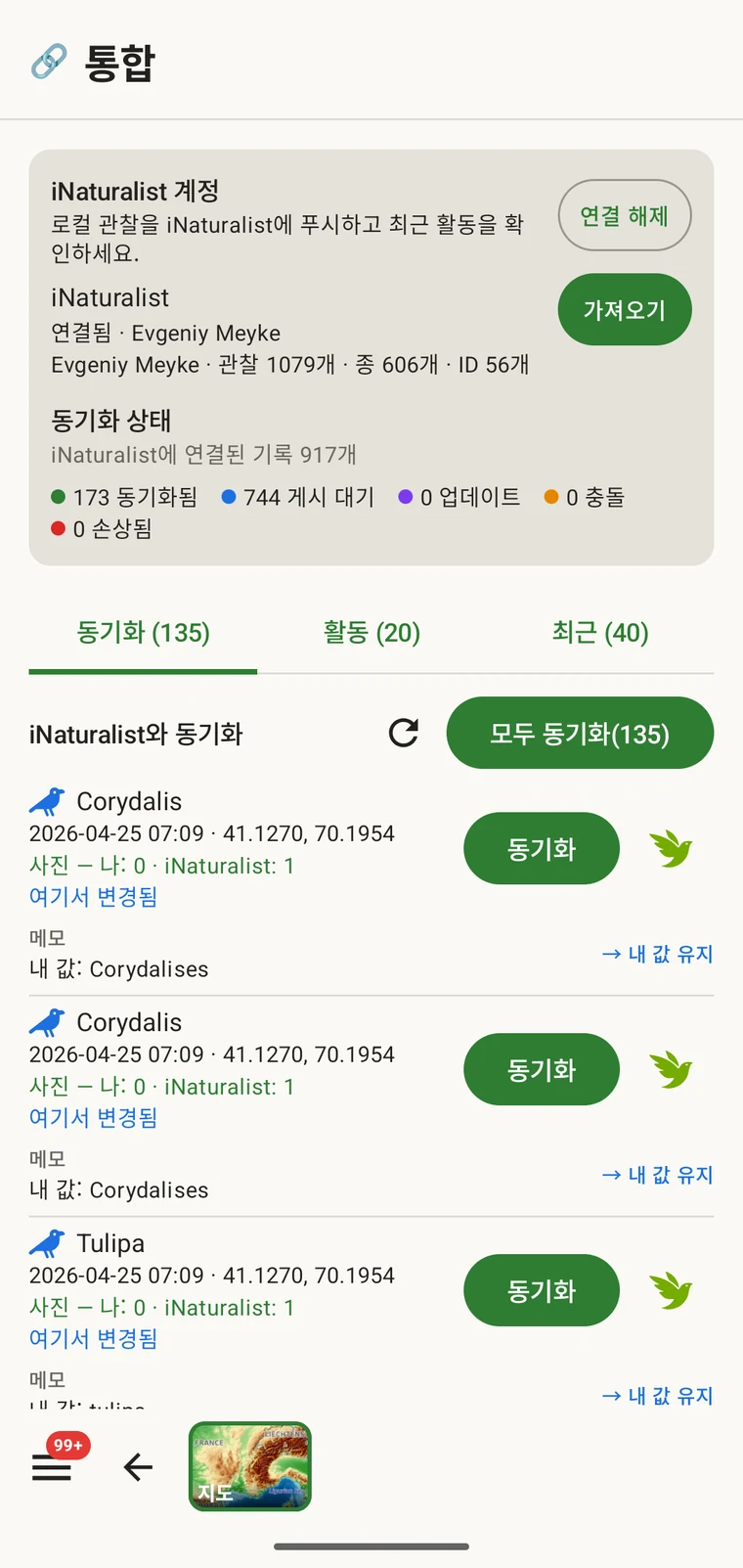
연결이 끝나면 iNaturalist 행을 열었을 때 허브로 이동합니다. iNaturalist와 관련된 모든 기능은 이 한 화면에서 접근합니다. 허브에는 연결된 계정, iNaturalist에 연결된 레코드가 몇 건이고 어떤 상태인지에 대한 요약, 그리고 동기화, 활동, 최근 세 개의 탭이 표시되며, 그 옆에 가져오기 기능이 있습니다.
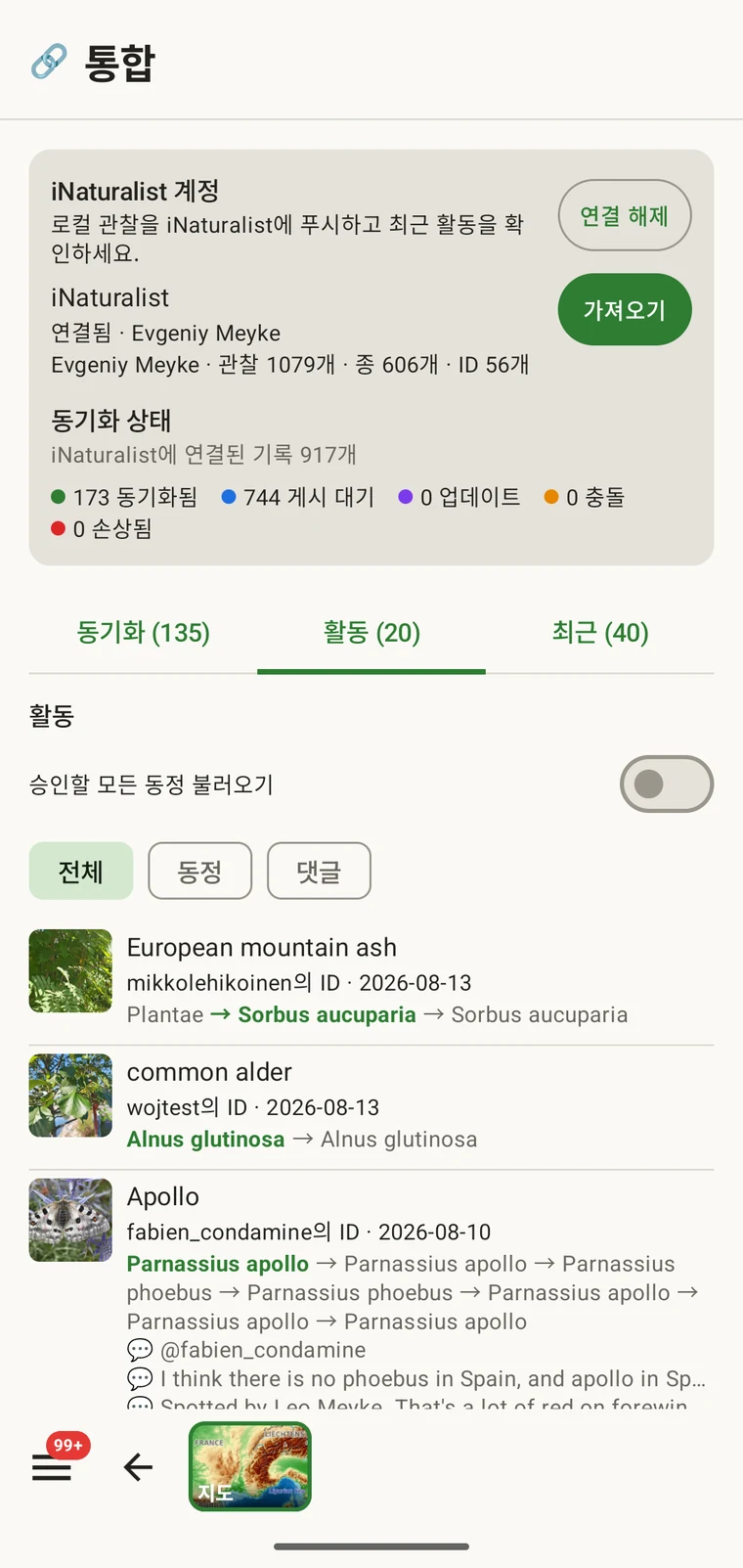
내 활동
The activity view shows your iNaturalist activity feed — the stream of events on your own observations and identifications. It is useful in the field because it lets you check notifications and recent identifications without leaving the recording app to open a browser. You can mark items seen and agree with an identification from the list.
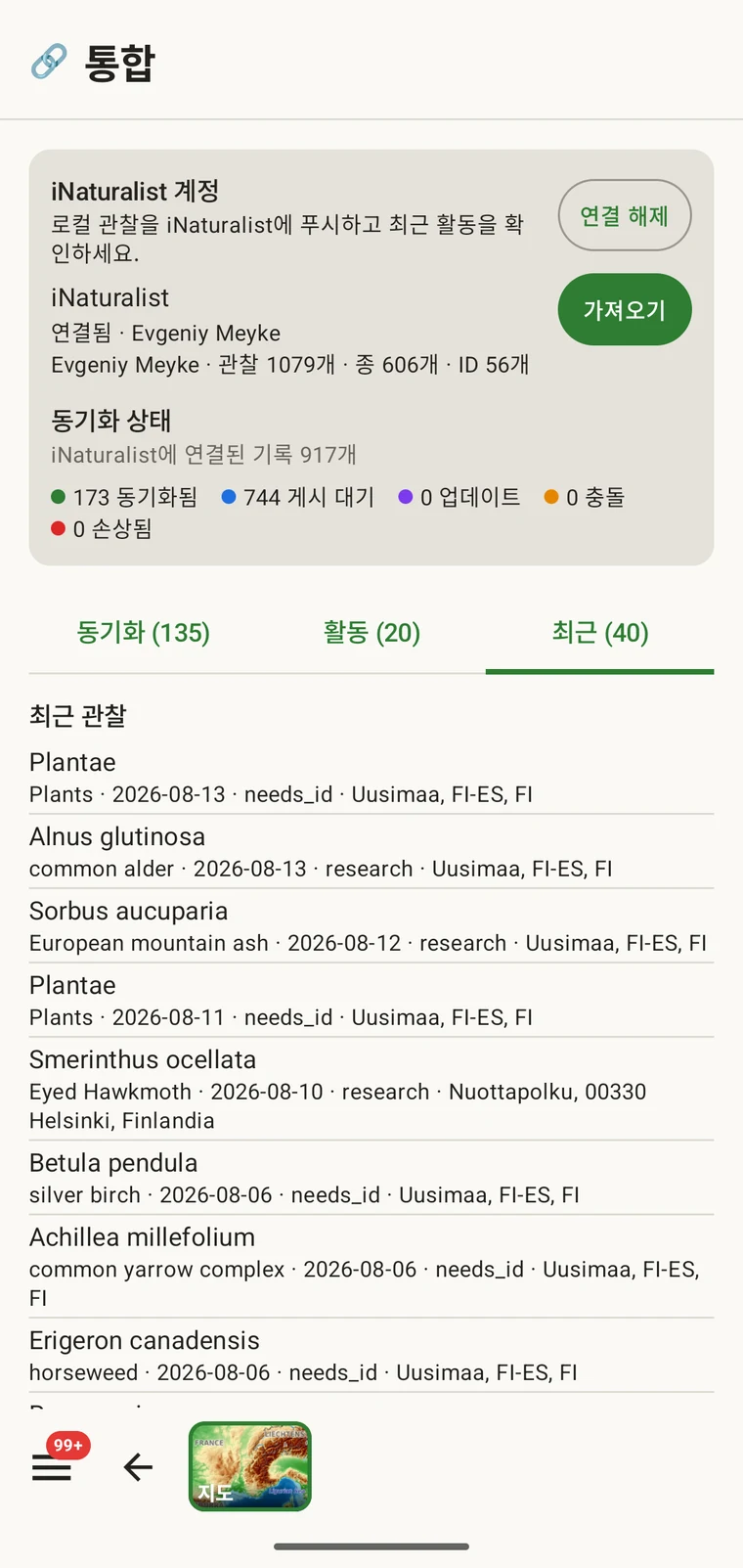
Recent observations and identifications
The recent view shows your own most recent iNaturalist observations and identifications, read from the iNaturalist API onto the device. This gives you a quick reference to what you have been recording on iNaturalist, alongside the records you are making in the current project.
관찰을 프로젝트로 가져오기
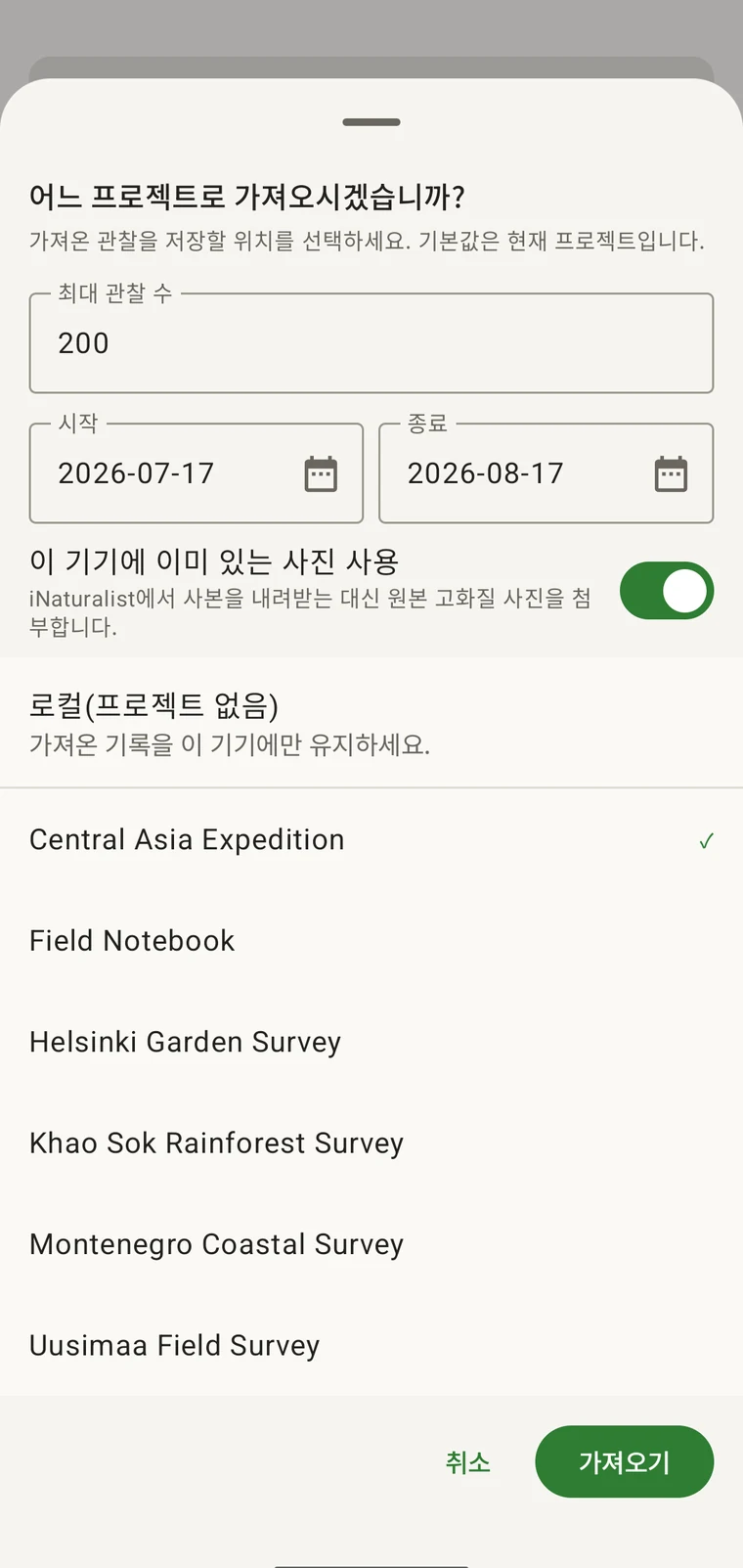
가져오기는 iNaturalist 계정의 관찰을 EarthCape 프로젝트로 일반 레코드처럼 들여옵니다. 레코드가 들어갈 프로젝트, 가져올 날짜 범위, 가져올 건수를 직접 고릅니다. 분류군, 날짜, 위치, 메모, 사진은 iNaturalist 관찰에서 그대로 보존됩니다. 가져오고 나면 레코드는 기기에 있습니다.
An iNaturalist record made at the same site on the same day belongs in the same dataset as the survey records. Without import, the two sets remain in separate systems and have to be reconciled later. After import, the iNaturalist records appear in the observations list (see Browsing your data), they appear on the map (see Map tools), and they leave in every export format (see Export formats).
- Open the iNaturalist hub from Menu → Admin → Integrations.
- 가져오기를 선택하십시오.
- 날짜 범위와 가져올 관찰의 최대 건수를 설정하십시오.
- 사진을 이 기기에서 가져올지, iNaturalist에서 내려받을지 선택하십시오.
- Pick the project the records should go into (or Local (no project)), then confirm with Import.
| 필드 | 가져올 때 유지되는 것 |
|---|---|
| 분류군 | iNaturalist 관찰의 분류군 이름이며, 기기 내 분류 체계와 대조됩니다 |
| 날짜 | iNaturalist에 기록된 관찰 날짜 |
| 위치 | 위도와 경도이며, iNaturalist에 위치 정확도가 있으면 함께 표시됩니다 |
| 비고 | 관찰 설명이며, 레코드의 메모로 보관됩니다 |
| 위치 공개 수준 | 공개, 흐림 또는 비공개이며, iNaturalist에 기록된 그대로 옮겨집니다 |
| 사진 | 전환 설정에 따라 기기에 이미 있는 원본 화질 사진이거나, iNaturalist에서 내려받은 사본입니다 |
| 프로토콜 양식 | 프로젝트의 프로토콜 양식이 첨부되며, iNaturalist에 기록되지 않은 필드는 비어 있는 상태로 남습니다 |
가져온 뒤의 동작
가져온 레코드는 프로젝트의 다른 레코드와 동일하게 동작합니다. 프로젝트의 프로토콜 양식을 지니므로(조사 프로토콜 참조), 레코드를 열어 원래 iNaturalist 관찰에 없던 필드를 채울 수 있습니다. 앱에서 직접 입력한 레코드와 나란히 관찰 목록과 지도에 나타납니다. Darwin Core 아카이브를 포함한 모든 내보내기 형식에 포함됩니다(내보내기 형식 참조).
가져온 레코드는 그것이 유래한 iNaturalist 관찰로의 링크를 유지하며, 덕분에 나중에 두 쪽이 서로 달라졌는지를 앱이 알려 줄 수 있습니다. 저절로 움직이는 것은 없습니다. 기기에서 한 편집은 기기에, iNaturalist에서 이루어진 편집은 iNaturalist에 남아 있다가, 사용자가 직접 레코드를 동기화할 때 비로소 반영됩니다.
iNaturalist로 레코드 보내기
The Sync tab lists the records that can go to your iNaturalist account and the state each one is in. Nothing is uploaded on its own. You send one record with the Sync button beside it, or send the listed batch with Sync all (N). Either way you choose what goes.
분류군, 날짜, 좌표, 위치 공개 수준, 메모, 사진이 전송됩니다. iNaturalist에 간 적이 없는 레코드는 그곳에 새로 만들어지고, 이전에 보낸 레코드는 제자리에서 갱신되므로 같은 레코드를 다시 동기화해도 중복이 생기지 않습니다.
| 상태 | 의미 |
|---|---|
| 동기화됨 | 기기의 사본과 iNaturalist의 사본이 일치합니다 |
| 여기에서 변경됨 | 마지막 동기화 이후 기기에서 레코드를 편집했습니다 |
| iNaturalist에서 변경됨 | 마지막 동기화 이후 iNaturalist에서 관찰이 편집되었습니다 |
| Conflict — choose a side | 마지막 동기화 이후 양쪽 사본이 모두 변경되어, 어느 쪽을 남길지 앱이 묻습니다 |
| 링크 끊김 | 연결된 관찰을 iNaturalist에서 더 이상 찾을 수 없습니다 |
충돌이 생기면 레코드가 펼쳐지면서 서로 다른 필드, 즉 분류군, 날짜, 좌표, 위치 공개 수준, 메모가 표시되고 각각에 내 것 또는 iNat 선택이 붙습니다. 선택하고 동기화하기 전까지는 어느 쪽에도 기록되지 않습니다.
제한
이 통합은 연결된 iNaturalist 계정에 있는 본인의 관찰을 양방향으로 다룹니다. 즉 거기에서 가져오고, 거기로 레코드를 다시 동기화합니다. 다른 사람의 주변 iNaturalist 관찰을 둘러보는 기능은 아닙니다.
Importing and syncing both need a connection at the moment you do them. Everything already on the device stays available and fully usable offline (see Offline maps); records not yet synced are listed in the Sync tab and go only when you tap Sync with a connection.
자신의 개인 관찰이 아니라 지점 주변 지역에 대해 게시된 출현 레코드 — 모든 iNaturalist 기여자와 그 밖의 데이터 제공자를 아우르는 — 를 원한다면, 그것은 다른 기능입니다: GBIF 주변 종을 참조하십시오.
개인정보 보호
사용자는 자신의 iNaturalist 계정으로 로그인하며, EarthCape는 비밀번호를 저장하지 않습니다. 연결은 통합 화면에서 언제든지 제거할 수 있고, 그러면 앱의 iNaturalist 계정 접근이 종료됩니다. 이미 가져온 관찰은 일반 레코드로 기기에 남으며, 연결을 끊어도 삭제되지 않습니다. 제거하려면 관찰 목록에서 삭제하십시오.
가져온 레코드는 다른 프로젝트 레코드와 마찬가지로 기기에 놓이며, 나머지 데이터와 동일한 로컬 저장 및 내보내기 관리를 받습니다. 동기화하지 않는 한 iNaturalist로 나가는 것은 없고, 무엇을 보낼지는 레코드마다 직접 고릅니다.