
통합
GBIF 주변 종
The app queries the published GBIF occurrence record around your current position and returns the taxa that have been recorded there, arranged in a taxonomic tree you can expand level by level and download from. It shows which groups are represented, how many distinct species (or higher taxa, at the detail level you choose) each group holds in the published record, and which names belong to those groups, before you start your own recording.
여는 방법
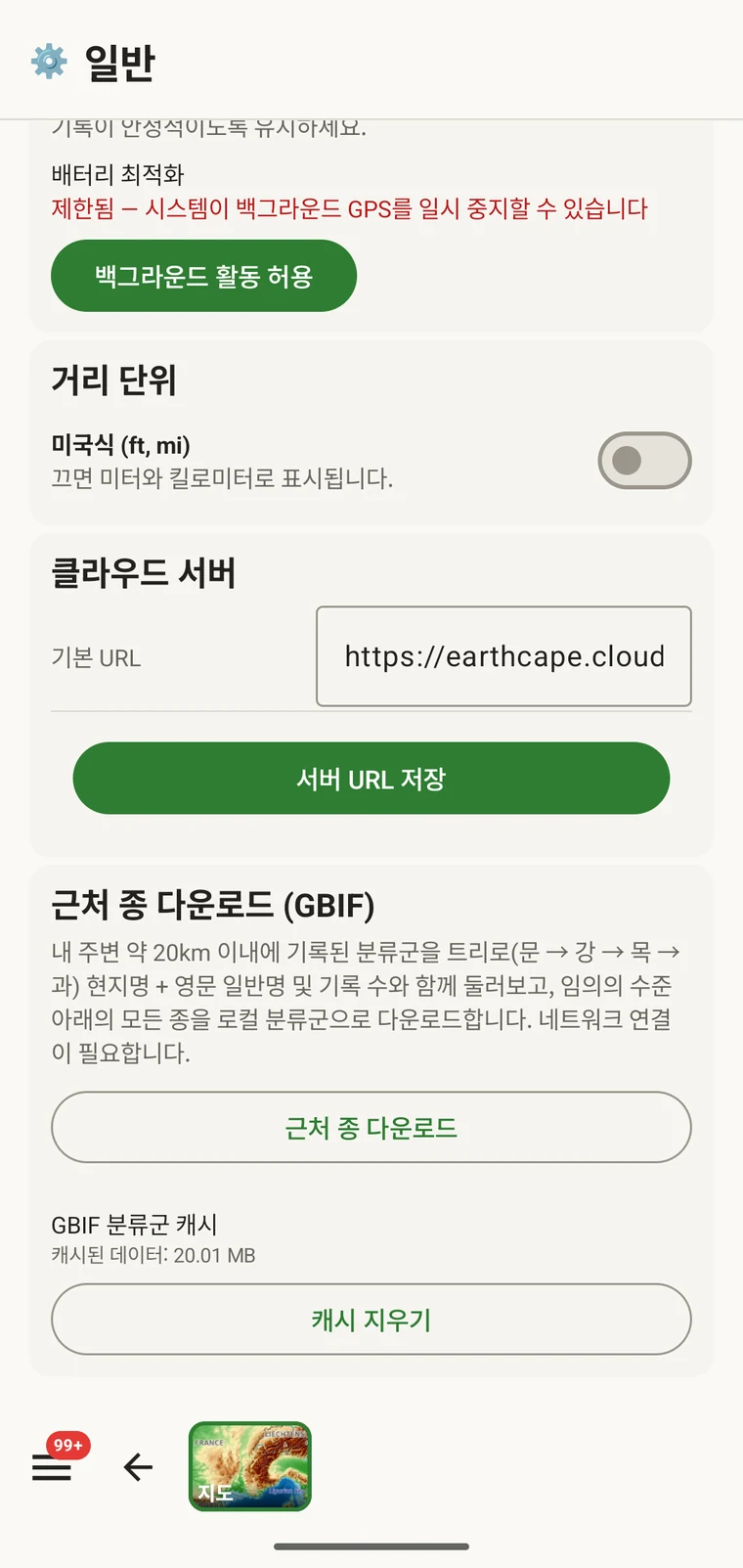
The entry point is the Download nearby species (GBIF) card under Menu → Admin → General; it is also offered during first-run setup. Scroll to the card and tap Download nearby species. The query runs against the live GBIF API, so you need a connection. Run it before you leave for the field, not once you have lost signal.
질의가 반환하는 것
The query looks at GBIF occurrence records within 20 km of your current position and groups them by phylum, giving for each phylum the number of distinct taxa at the chosen detail level (species by default). The sheet shows the top-level summary once Get data has run.
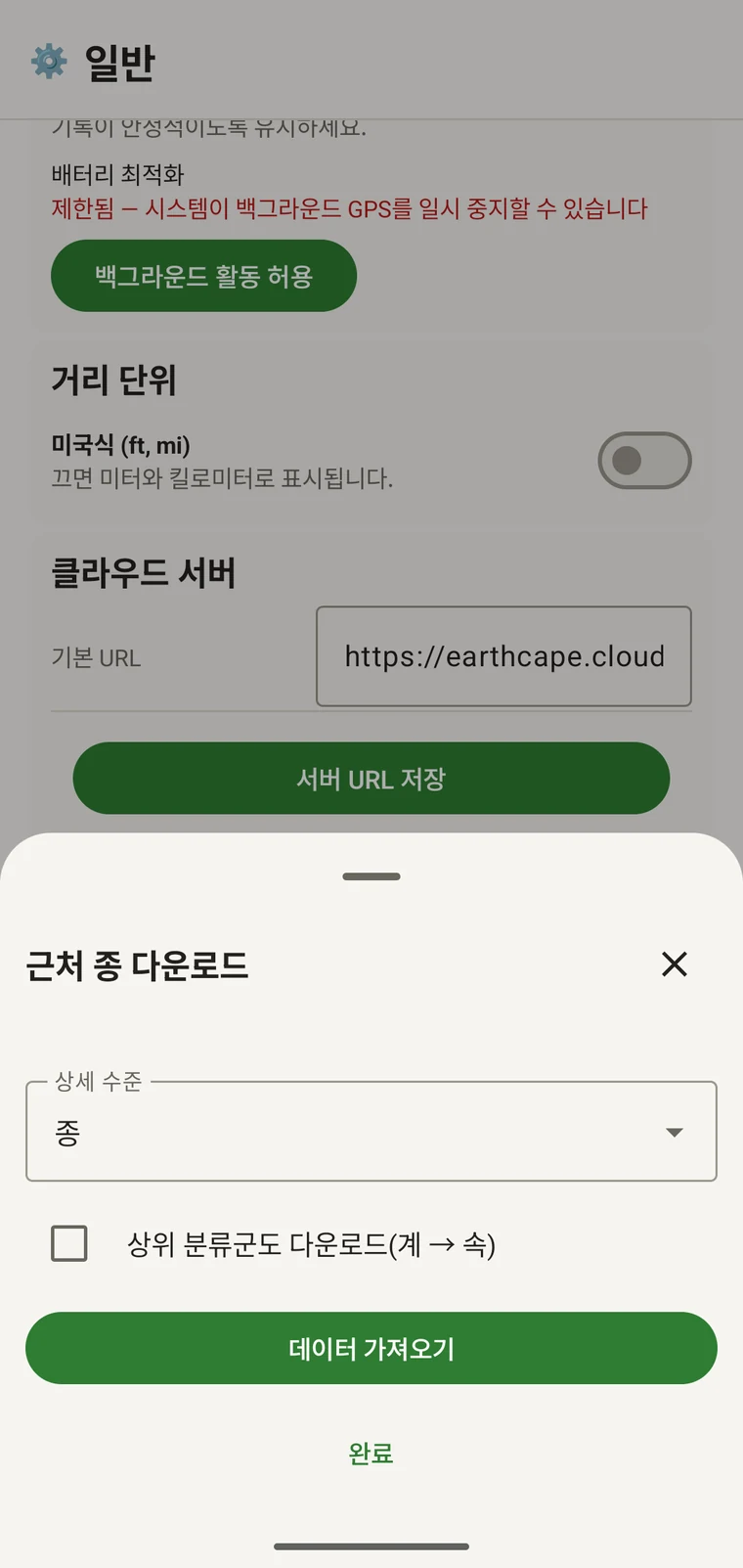
On opening, the sheet shows two controls and two buttons:
- Detail level (Phylum, Class, Order, Family or Species; Species is the default) — sets how far down the taxonomy the download goes when you tick a group.
- Also download parent taxa (kingdom → genus) checkbox — off by default; covered in its own section below.
- Get data — takes a GPS fix and loads the taxonomic tree for the area. Nothing is downloaded yet.
- 완료 — 시트를 닫습니다.
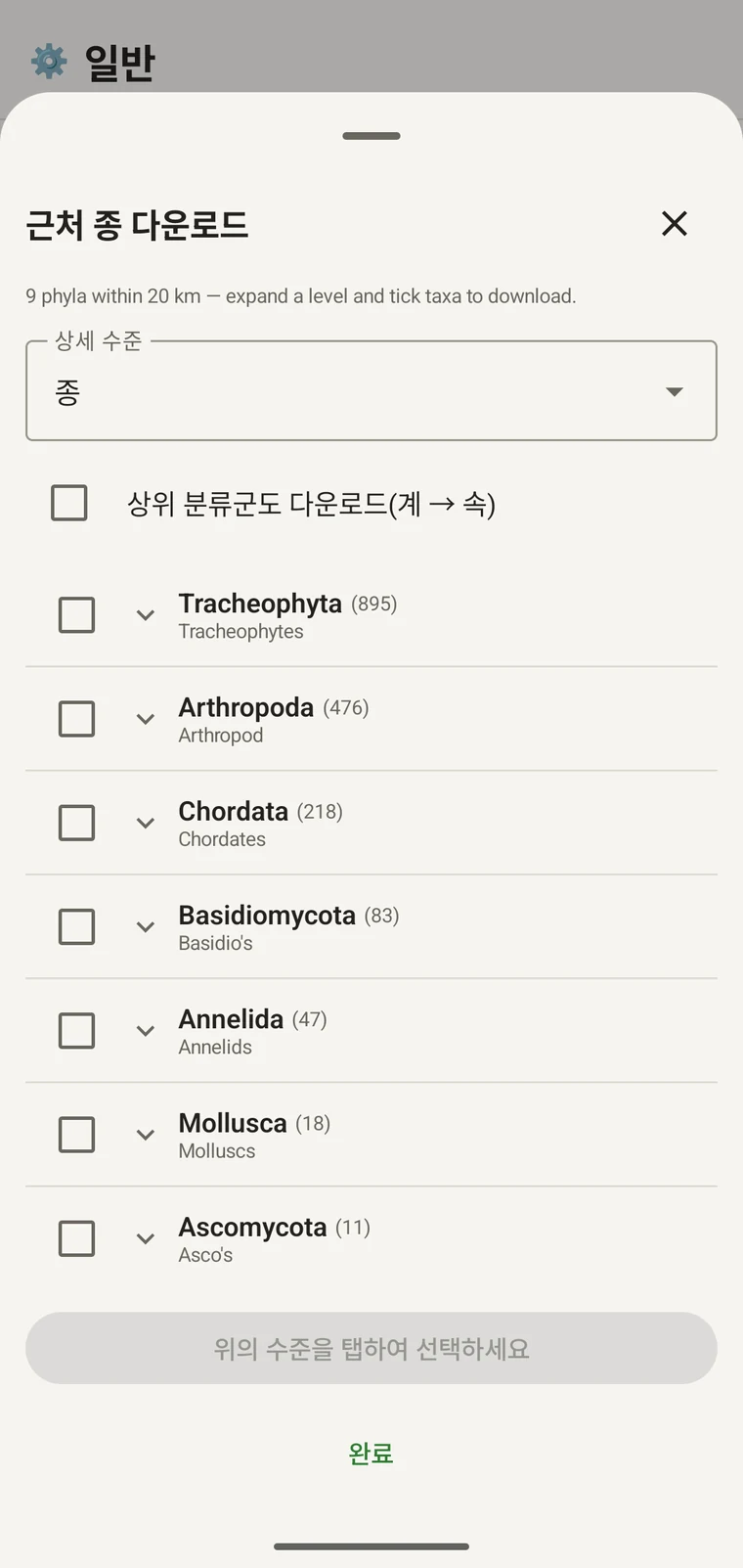
Once the tree has loaded the header reads, for example, "9 phyla within 20 km — expand a level and tick taxa to download.", a Select all row appears above the tree, and a Download N selected button replaces Get data.
아래 예시는 어느 산악 지역 조사에서 가져온 것입니다. 자신의 지점에서는 그 지점의 수치가 반환됩니다.
| 문 | Species within 20 km |
|---|---|
| Tracheophyta | 895 |
| Arthropoda | 476 |
| Chordata | 218 |
| Basidiomycota | 83 |
| Annelida | 47 |
| Mollusca | 18 |
| Ascomycota | 11 |
단계별로 펼치기
Tap a phylum to expand it to its constituent classes, and tap a class to expand to orders. At each level the number in brackets is the count of distinct taxa at the chosen detail level recorded under that group within the search radius. A count shown as 1,000+ has hit the query cap.
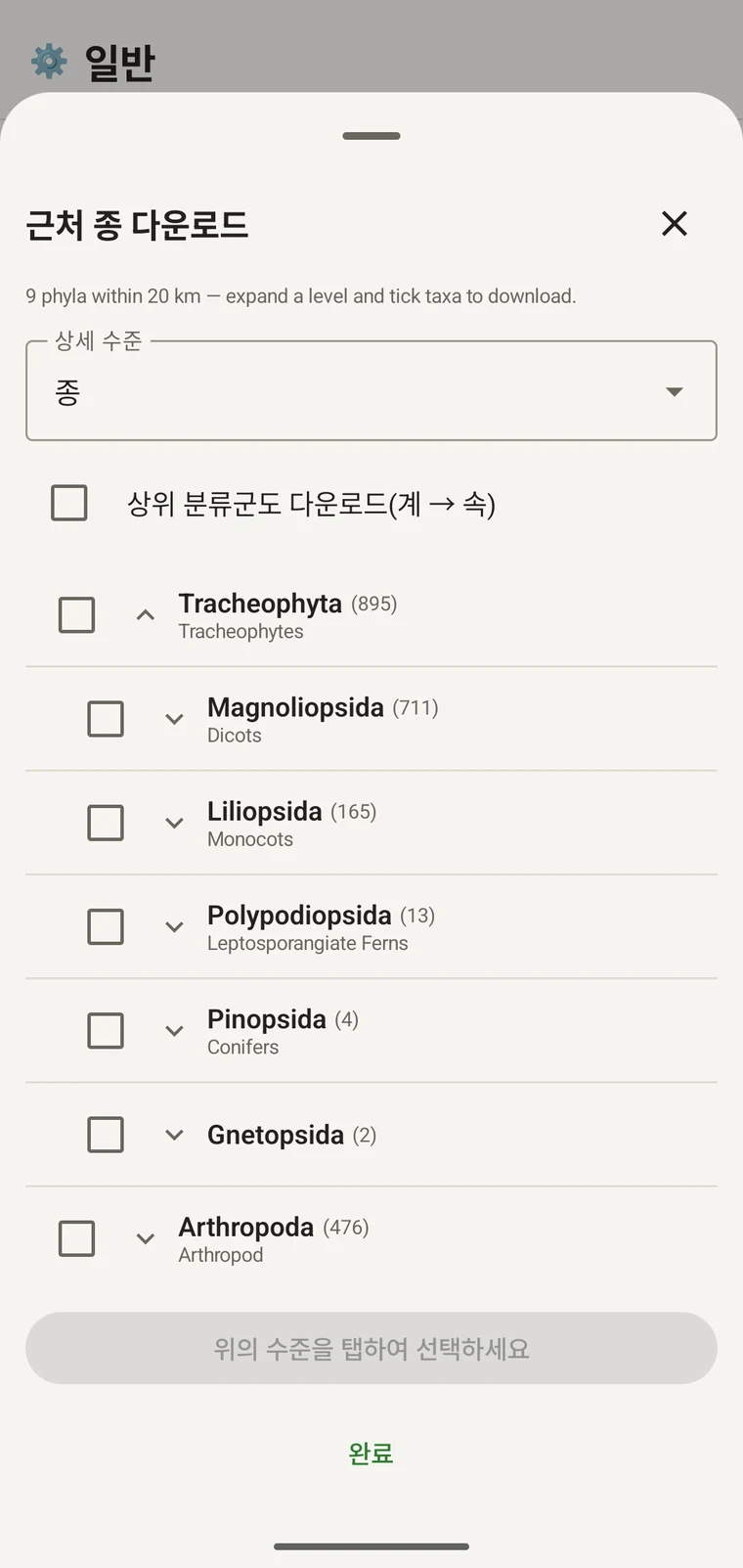
같은 예시를 이어 보면: Tracheophyta는 Magnoliopsida 711, Liliopsida 165, Polypodiopsida 13, Pinopsida 4, Gnetopsida 2로 펼쳐집니다. Magnoliopsida를 펼치면 Asterales 115, Lamiales 100, Fabales 93, Rosales 56, Caryophyllales 49가 각각 일반명과 함께 표시됩니다.
The counts are numbers of distinct taxa in the published record, not record totals and not abundance estimates. A high count means many taxa in that group have been recorded and published for this area; a low count means the group is either genuinely species-poor here or simply under-surveyed and under-published. The distinction matters when you use the figures to plan work — see the section on survey planning below.
상세 수준과 상위 분류군
The Detail level control sets the rank down to which taxa are downloaded when you tick a group. At Species, the download includes all species in GBIF's record for that group within the radius. If you are working at a coarser resolution — mapping genera only, for example — you can set the detail level to Family, Order, Class or Phylum to reduce the volume of names brought onto the device.
The Also download parent taxa (kingdom → genus) checkbox controls whether the higher ranks are fetched alongside the species. It is off by default; tick it in almost every case. Without it, the species names arrive on the device as orphans: the taxonomy held locally has no genus, family or order to attach them to, so they cannot be browsed by higher taxon and any rollup by group in your own data will not resolve correctly. Leave it off only if storage is genuinely tight and you intend to work entirely at species level with no hierarchical browsing.
분류군을 기기로 다운로드하기
Nothing is pre-loaded onto the device for any particular site. The GBIF query populates the local taxonomy with GBIF Backbone names known to occur nearby, so when you record an observation you are picking from taxa that have actually been found at the site, rather than searching the full global list — and those names stay on the device once they are downloaded.
- 상세 수준을 기록 요구에 맞는 계급으로 설정하십시오. 기본값은 종입니다.
- Tap Get data to load the tree for your position.
- 문을 탭해 펼친 다음, 원하는 강이나 목까지 더 펼치십시오.
- 기록할 각 그룹 옆의 체크박스를 체크하십시오. 어느 계급에서든 체크할 수 있으며, 강을 체크하면 설정한 상세 수준까지 그에 속한 모든 분류군이 다운로드됩니다.
- Tick Also download parent taxa unless storage is genuinely tight.
- Tap Download N selected. The app fetches the ticked taxa from GBIF and writes them to the local database in the background; a notification shows progress and you can close the sheet meanwhile.
- 완료를 눌러 시트를 닫습니다.
다운로드한 이름은 관찰 기록에서 관찰을 입력할 때 오프라인으로 검색할 수 있습니다. 전체 전 지구 분류 체계를 상대로 기억에 의존해 입력하는 대신, 해당 지역에 분포하는 것으로 알려진 이름 중에서 고르게 됩니다.
조사 계획에 활용하기
현장 조사 시즌에 앞서 대상 지역에 대해 질의를 실행하고, 무엇을 다운로드하기 전에 문 수준의 건수를 확인하십시오. 건수의 분포는 해당 지역의 공개된 기록에서 어떤 분류군이 충분히 대표되고 있으며 어떤 분류군이 거의 나타나지 않는지를 보여 줍니다.
A phylum with a handful of taxa is either genuinely absent from the site or under-surveyed and under-published there. Both cases are useful to know before a trip: genuine absence tells you where not to spend effort, and a thin published record for a group you expect to be present identifies a gap you can target.
해당 일정에서 실제로 기록할 분류군만 다운로드하십시오. 문 하나를 대상으로 작업한다면 전체 계통수를 기기에 올릴 이유가 없습니다. 다운로드에는 시간과, 확보하지 못할 수도 있는 연결 대역폭이 필요합니다.
제한
이 질의에는 GBIF API에 대한 실시간 연결이 필요합니다. 오프라인에서는 실행할 수 없으며, 그래서 연결이 가능한 곳을 떠나기 전에 실행하는 것이 의도된 절차입니다.
The search radius is 20 km around your current position. This is fixed by the query; there is no radius control in the app.
건수는 GBIF에 공개된 내용을 반영합니다. 자료의 충실도는 지역별로, 분류군별로 고르지 않습니다. 서유럽의 척추동물은 대개 잘 대표되어 있지만 중앙아시아의 무척추동물과 균류는 그렇지 않습니다. 낮은 건수는 해당 분류군과 지역의 조합에 대한 공개 기록에 관한 진술이며, 그 지역 자체에 대한 직접적인 진술이 아닙니다. 이 점을 염두에 두고 수치를 해석하십시오.
앱에서 GBIF로 공개하는 기능은 없습니다. 이 통합은 읽기 전용으로, 기존 기록을 질의하고 분류군 이름을 다운로드합니다. 직접 만든 데이터를 GBIF에 기여하려면 앱에서 Darwin Core 아카이브 또는 GBIF DwC-DP 파일을 내보낸 뒤 표준 GBIF 경로로 제출하십시오. 사용 가능한 파일 형식은 내보내기 형식을 참조하십시오.