
Tích hợp
Loài lân cận theo GBIF
The app queries the published GBIF occurrence record around your current position and returns the taxa that have been recorded there, arranged in a taxonomic tree you can expand level by level and download from. It shows which groups are represented, how many distinct species (or higher taxa, at the detail level you choose) each group holds in the published record, and which names belong to those groups, before you start your own recording.
Mở chức năng này
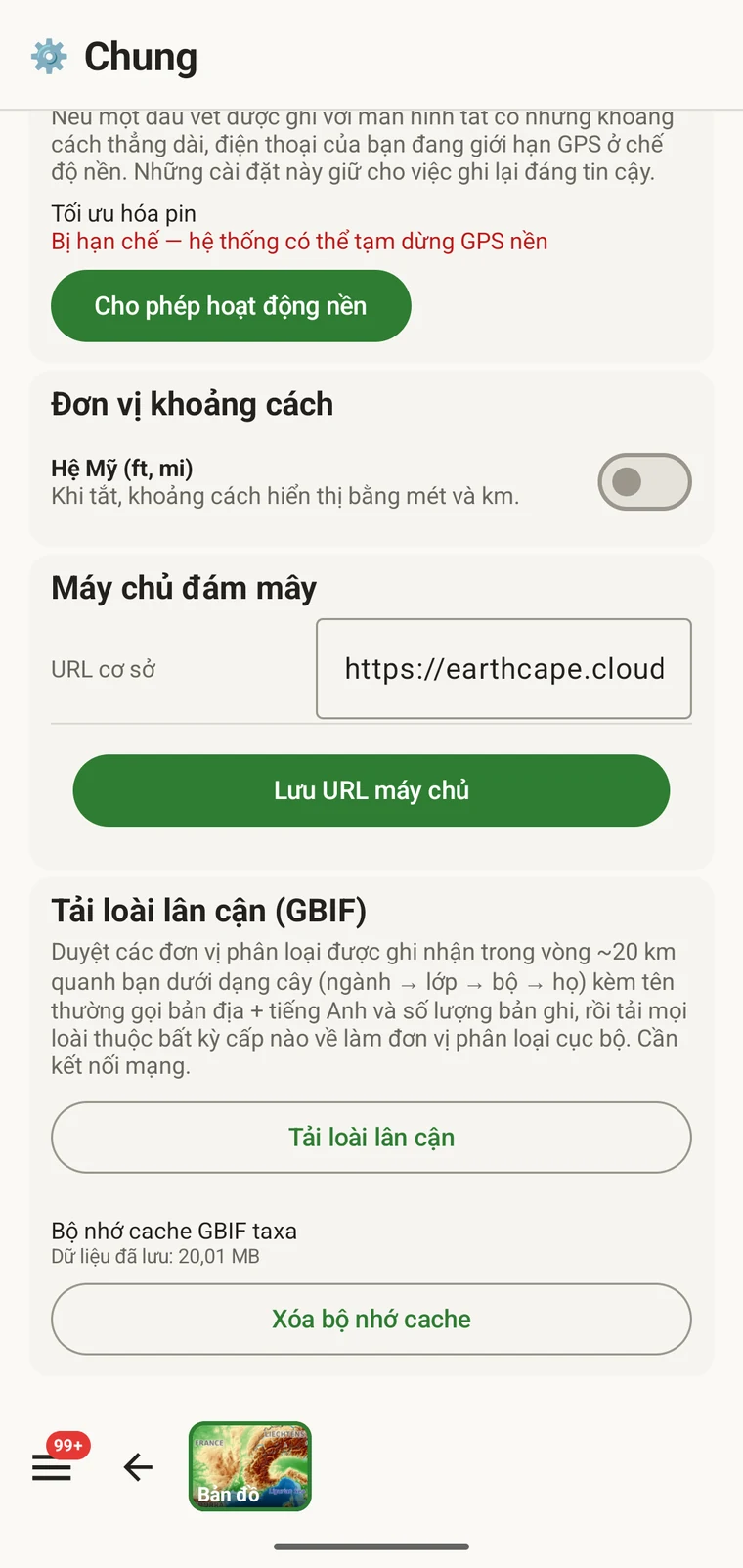
The entry point is the Download nearby species (GBIF) card under Menu → Admin → General; it is also offered during first-run setup. Scroll to the card and tap Download nearby species. The query runs against the live GBIF API, so you need a connection. Run it before you leave for the field, not once you have lost signal.
Truy vấn trả về những gì
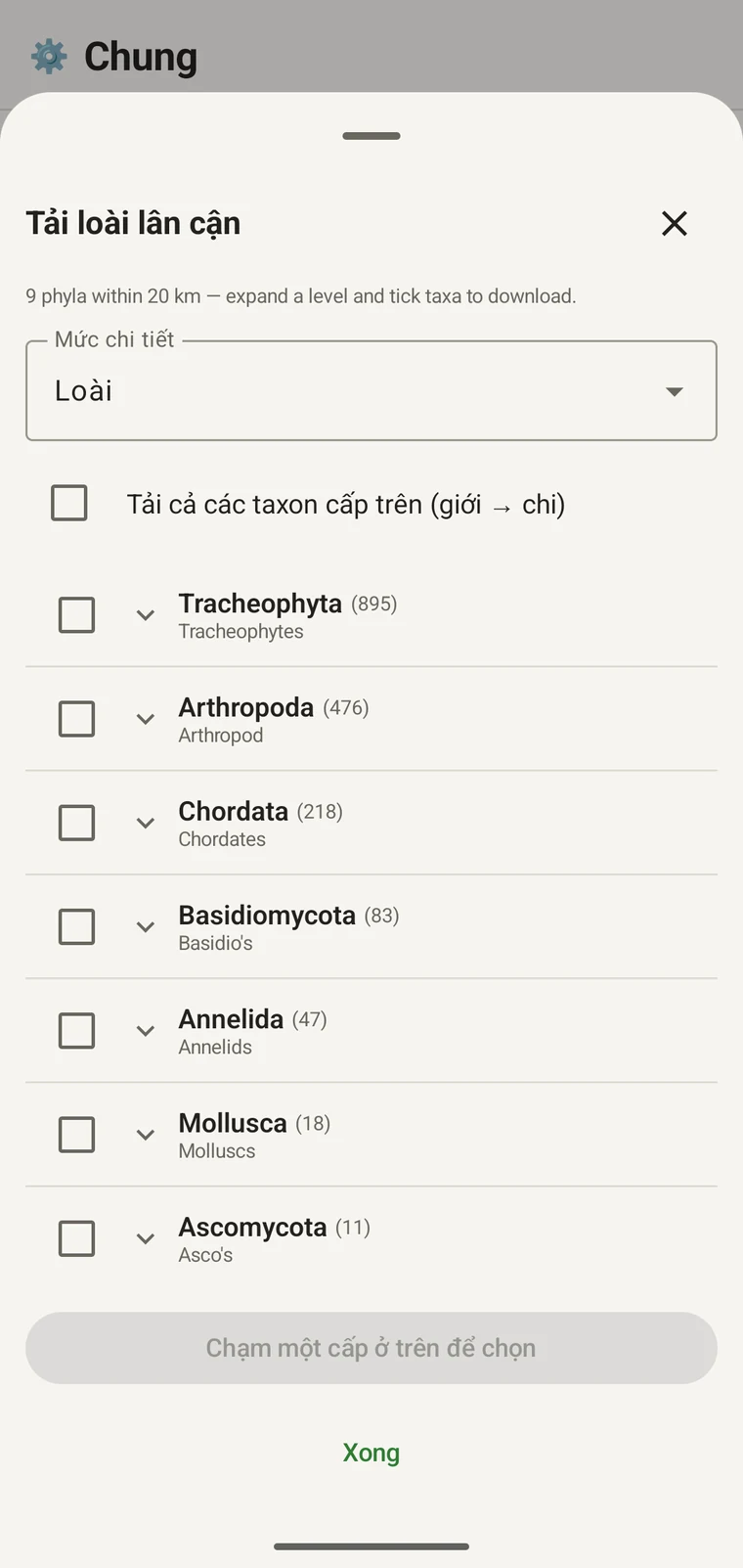
The query looks at GBIF occurrence records within 20 km of your current position and groups them by phylum, giving for each phylum the number of distinct taxa at the chosen detail level (species by default). The sheet shows the top-level summary once Get data has run.
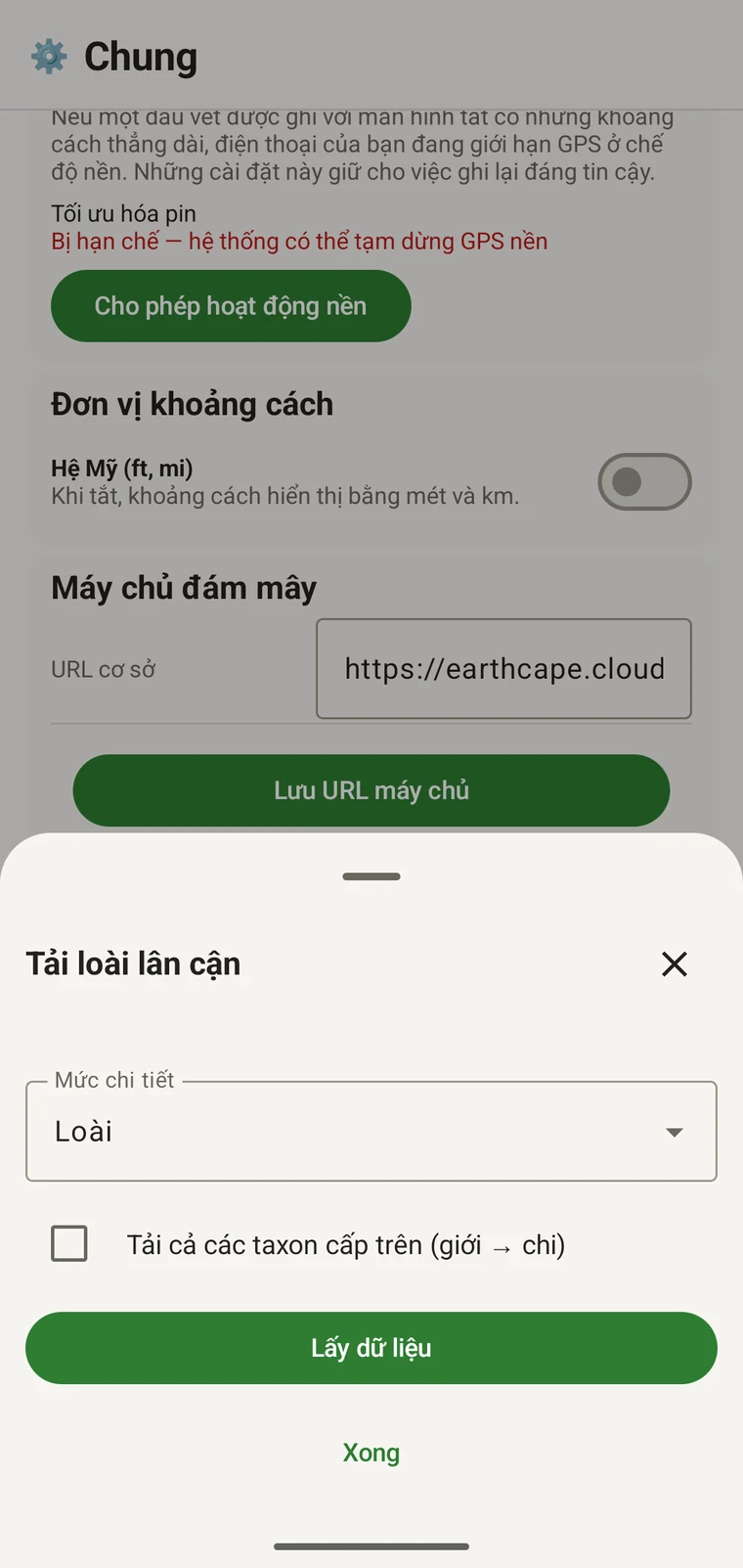
On opening, the sheet shows two controls and two buttons:
- Detail level (Phylum, Class, Order, Family or Species; Species is the default) — sets how far down the taxonomy the download goes when you tick a group.
- Also download parent taxa (kingdom → genus) checkbox — off by default; covered in its own section below.
- Get data — takes a GPS fix and loads the taxonomic tree for the area. Nothing is downloaded yet.
- Xong — đóng bảng trượt.
Once the tree has loaded the header reads, for example, "9 phyla within 20 km — expand a level and tick taxa to download.", a Select all row appears above the tree, and a Download N selected button replaces Get data.
Ví dụ dưới đây lấy từ một cuộc khảo sát vùng núi. Khu vực của riêng bạn sẽ trả về những con số riêng.
| Ngành | Species within 20 km |
|---|---|
| Tracheophyta | 895 |
| Arthropoda | 476 |
| Chordata | 218 |
| Basidiomycota | 83 |
| Annelida | 47 |
| Mollusca | 18 |
| Ascomycota | 11 |
Đi sâu vào chi tiết
Tap a phylum to expand it to its constituent classes, and tap a class to expand to orders. At each level the number in brackets is the count of distinct taxa at the chosen detail level recorded under that group within the search radius. A count shown as 1,000+ has hit the query cap.
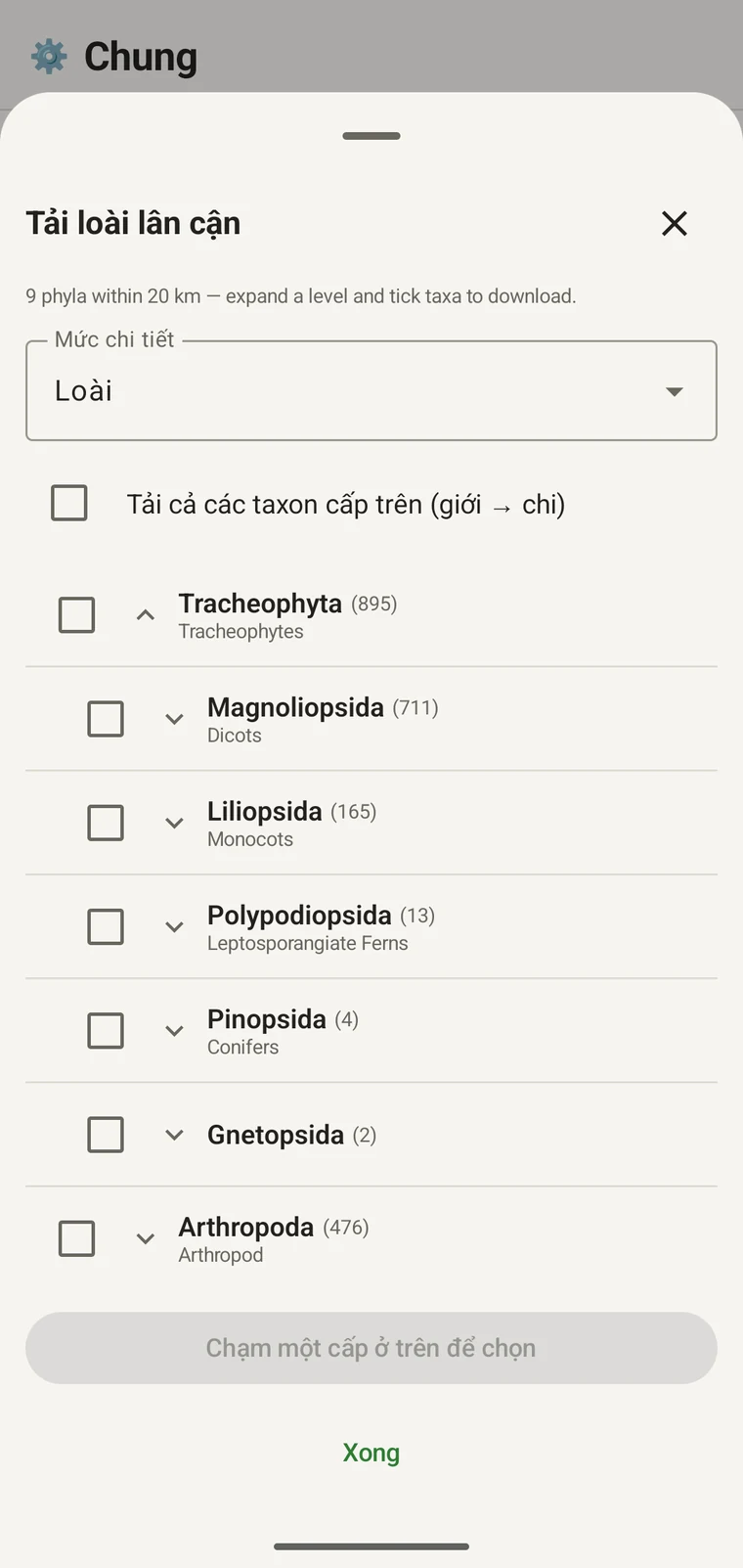
Tiếp tục cùng ví dụ đó: Tracheophyta mở rộng thành Magnoliopsida 711, Liliopsida 165, Polypodiopsida 13, Pinopsida 4, Gnetopsida 2. Mở rộng Magnoliopsida cho ra Asterales 115, Lamiales 100, Fabales 93, Rosales 56, Caryophyllales 49, mỗi bộ hiển thị kèm tên thông thường.
The counts are numbers of distinct taxa in the published record, not record totals and not abundance estimates. A high count means many taxa in that group have been recorded and published for this area; a low count means the group is either genuinely species-poor here or simply under-surveyed and under-published. The distinction matters when you use the figures to plan work — see the section on survey planning below.
Mức chi tiết và đơn vị phân loại cha
The Detail level control sets the rank down to which taxa are downloaded when you tick a group. At Species, the download includes all species in GBIF's record for that group within the radius. If you are working at a coarser resolution — mapping genera only, for example — you can set the detail level to Family, Order, Class or Phylum to reduce the volume of names brought onto the device.
The Also download parent taxa (kingdom → genus) checkbox controls whether the higher ranks are fetched alongside the species. It is off by default; tick it in almost every case. Without it, the species names arrive on the device as orphans: the taxonomy held locally has no genus, family or order to attach them to, so they cannot be browsed by higher taxon and any rollup by group in your own data will not resolve correctly. Leave it off only if storage is genuinely tight and you intend to work entirely at species level with no hierarchical browsing.
Tải đơn vị phân loại về thiết bị
Nothing is pre-loaded onto the device for any particular site. The GBIF query populates the local taxonomy with GBIF Backbone names known to occur nearby, so when you record an observation you are picking from taxa that have actually been found at the site, rather than searching the full global list — and those names stay on the device once they are downloaded.
- Đặt Mức chi tiết ở bậc phù hợp với nhu cầu ghi chép của bạn. Mặc định là Loài.
- Tap Get data to load the tree for your position.
- Chạm vào một ngành để mở rộng nó, rồi mở rộng tiếp tới lớp hoặc bộ bạn muốn.
- Đánh dấu ô bên cạnh mỗi nhóm bạn sẽ ghi chép. Bạn có thể đánh dấu ở bất kỳ bậc nào — đánh dấu một lớp sẽ tải mọi đơn vị phân loại cấu thành của nó xuống tới mức chi tiết bạn đã đặt.
- Tick Also download parent taxa unless storage is genuinely tight.
- Tap Download N selected. The app fetches the ticked taxa from GBIF and writes them to the local database in the background; a notification shows progress and you can close the sheet meanwhile.
- Chạm vào Xong để đóng bảng trượt.
Những tên đã tải sau đó có thể tìm kiếm khi ngoại tuyến lúc bạn nhập quan sát trong Ghi chép quan sát. Bạn đang chọn từ những tên được biết là có mặt tại địa phương thay vì gõ theo trí nhớ dựa trên toàn bộ hệ thống phân loại toàn cầu.
Dùng nó để lập kế hoạch khảo sát
Trước một mùa thực địa, hãy chạy truy vấn trên khu vực bạn dự định khảo sát và đọc số lượng ở cấp ngành trước khi tải bất cứ thứ gì về. Phân bố của các con số cho bạn biết nhóm nào được thể hiện đầy đủ trong dữ liệu đã công bố cho vùng đó và nhóm nào gần như vắng bóng.
A phylum with a handful of taxa is either genuinely absent from the site or under-surveyed and under-published there. Both cases are useful to know before a trip: genuine absence tells you where not to spend effort, and a thin published record for a group you expect to be present identifies a gap you can target.
Chỉ tải các đơn vị phân loại cho những nhóm bạn sẽ thực sự ghi chép trong chuyến đi đó. Không có lợi ích gì khi nạp toàn bộ cây phân loại vào thiết bị nếu bạn chỉ làm việc với một ngành duy nhất; việc tải về tốn thời gian và băng thông kết nối mà bạn có thể không có.
Giới hạn
Truy vấn cần kết nối trực tiếp tới GBIF API. Nó không chạy được ở chế độ ngoại tuyến, và đó là lý do quy trình dự kiến là chạy truy vấn trước khi bạn rời khỏi nơi có kết nối.
The search radius is 20 km around your current position. This is fixed by the query; there is no radius control in the app.
Các con số phản ánh những gì đã được công bố lên GBIF. Mức độ bao phủ không đồng đều giữa các vùng và giữa các nhóm phân loại: động vật có xương sống ở Tây Âu thường được thể hiện đầy đủ; động vật không xương sống và nấm ở Trung Á thì không. Một con số thấp là nhận định về dữ liệu đã công bố cho tổ hợp nhóm và địa điểm đó, chứ không phải nhận định trực tiếp về bản thân khu vực. Hãy diễn giải các số liệu với lưu ý đó.
Không có việc công bố từ ứng dụng lên GBIF. Phần tích hợp này chỉ đọc: bạn truy vấn các bản ghi hiện có và tải tên đơn vị phân loại về. Để đóng góp dữ liệu của riêng bạn cho GBIF, hãy xuất tệp Darwin Core Archive hoặc GBIF DwC-DP từ ứng dụng rồi nộp theo quy trình GBIF thông thường — xem Định dạng xuất để biết các định dạng tệp có sẵn.